
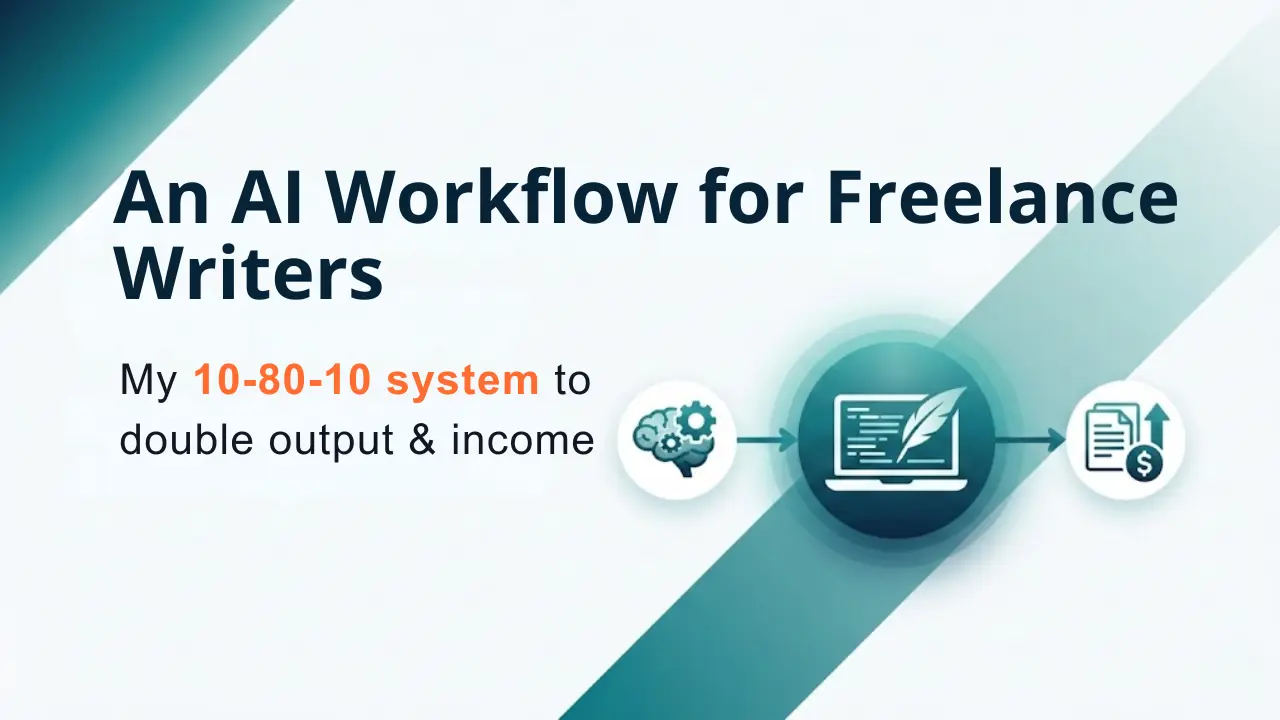
My Freelance AI Writing Workflow: How I Double Output and Income (Without Losing My Soul)
Two years ago, I was terrified. I’d spend an hour drafting an email, only to imagine my client discovering I had used AI somewhere in the process and firing me on the spot. The anxiety was real.
Back then, the narrative was simple: AI tools steal jobs. Use one, and you’re a fraud. But something fundamental shifted. It wasn’t that AI got better (though it did), but because the economy changed. Clients stopped paying for typing. They started paying for outcomes, meaning that optimizing your freelance AI writing workflow is the only way to stay competitive.
It’s how to use it strategically, in a way that makes your work better, your deadlines shorter, and your clients happier. Because when you’re working with AI as a thinking partner rather than a shortcut, something unexpected happens: you become more valuable, not less.
This is what I want to share with you. As a freelance writer, I don’t use AI to write for me. I use it to think with me. And that distinction changes everything.
Quick Answer: Structure your freelance AI writing workflow into three phases, consisting of 10% human strategy, 80% AI drafting, and 10% human humanization and fact-checking. This “10-80-10 rule” lets you ship client work 2-3x faster while maintaining total quality control and ownership.
Key Takeaways
- 10-80-10 Rule: 10% human strategy, 80% AI drafting, 10% human humanization. This multiplies output without sacrificing ownership.
- NotebookLM + Gemini: Your research assistant that grounds AI in your actual sources with no hallucinations.
- Perplexity for fact-checking: Real-time verification with citations. Better than Google Search for this task.
- Humanization is the leverage: AI detects that your draft sounds flat. Edit for sentence variation, anecdotes, and unique voice.
- Legal: AI-only output isn’t copyrightable. Human edits are. Disclose and document your contribution.
- Upwork/Fiverr rules (2026): Disclose AI use. Get client permission. Opt out of platform AI training if you want privacy.
- Automate admin: Use Make.com to automate folders, calendars, invoices, and reclaim 10+ hours monthly for actual work.
Why the Old “No AI” Approach for Freelance Writing Is Dead
Let me be direct: if you’re a freelance writer in 2026 and you’re not using AI to augment your workflow, you’re already behind. Research shows that AI can accelerate complex writing tasks by up to 80%. But here’s what most freelancers get wrong: they think speed is the payoff.
Speed is nice. The real payoff is strategy.
When you move from hourly billing to project-based pricing, a streamlined AI writing workflow becomes your profit engine. A project that used to take 40 hours now takes 12. You bill it the same. Suddenly, you’ve tripled your effective hourly rate without cutting corners.
But that only works if you keep your fingerprints all over the work. Because if it’s purely AI-generated output, it’s not yours to sell legally or ethically.
That’s where the 10-80-10 rule comes in.
The 10-80-10 Delegation Rule: Your AI Freelance Writing Operating System
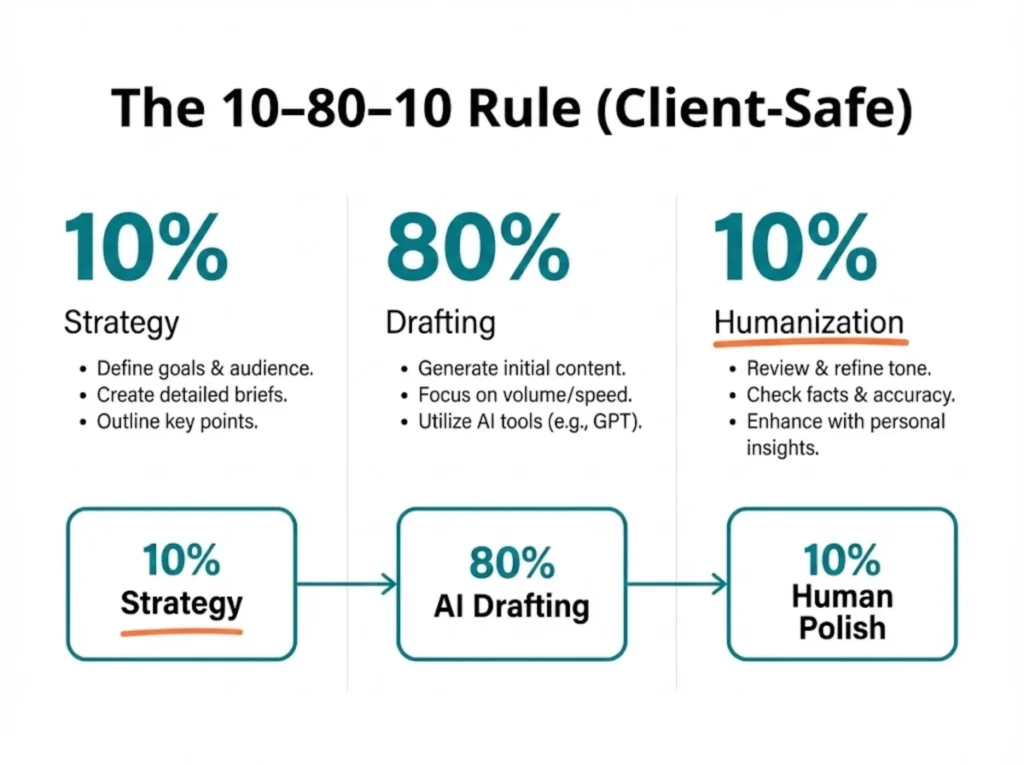
Think of your writing process as a value chain. Each phase has a different purpose, and each requires different hands on the keyboard.
| Phase | What Happens | Who Does It | Time | Value Delivered |
| Phase 1: Strategy (10%) | You interview the client, define voice, set guardrails, choose the core message | You | 4 hours | Direction. Without this, AI drowns you in mediocrity. |
| Phase 2: Drafting (80%) | AI generates structure, outlines, first drafts, data synthesis, brainstorming | AI (you directing) | 8 hours | Volume. Velocity. The boring, heavy lifting. |
| Phase 3: Humanization (10%) | You edit, fact-check, inject personality, rewrite weak sections, polish | You | 4 hours | Trust. The unmistakable human touch. |
This is not the same as letting AI write and you proofreading.
Proofreading is about correcting typos. Humanization is about rebuilding the article from the inside, using AI’s structure as scaffolding but your voice as the foundation.
Here’s the economic shift: if you charge project-based fees, this workflow means you earn three times as much per hour worked. If you’re still charging hourly, you’re robbing yourself. The moment you commit to AI in your workflow is the moment you must switch to value pricing.
1: Research & Ideation—The High-Signal Approach
The first 10% is everything.
This is where you sit with your client (or your own insights) and ask the hard questions: What does the reader actually need? What will make them act? What voice do we need to win trust? What data points matter most?
Here’s where most freelancers fail with AI: they skip this phase entirely. They throw a vague prompt at ChatGPT and hope. Then they blame the AI when the output feels generic.
The truth: AI is a research assistant, not a strategist. It finds the dots. You connect them. And that only works if you know what dots matter.
Want to know more about the MUST HAVES for Freelance writers in the AI era? Read this article: Before You Use AI for Freelance Writing, You MUST Do This (The 2026 Survival Protocol)
AI Tool Spotlight: NotebookLM + Gemini Integration
In late 2025, Google released something game-changing: a direct integration between NotebookLM and Gemini. This is the secret weapon of high-output freelancers right now.
Here’s how I structure the research phase of my AI writing workflow:
- I upload everything into NotebookLM: client PDFs, brand guidelines, past articles, competitor research, raw interview transcripts, YouTube video links, files from Google Drive, and even pasted text from the clipboard.
- NotebookLM organizes it all: It reads 300+ sources at once, builds summaries, creates outlines, and surfaces key themes without hallucinating.
- I attach the notebook to Gemini: When I open Gemini and attach my NotebookLM project, I now have a research assistant that knows my specific project and can reason across all my sources.
- I ask it to do the hard thinking: For example, “Based on these sources, what are the three biggest misconceptions about AI copyright for freelancers? Create a framework I can use to guide the next steps of my AI writing workflow.“
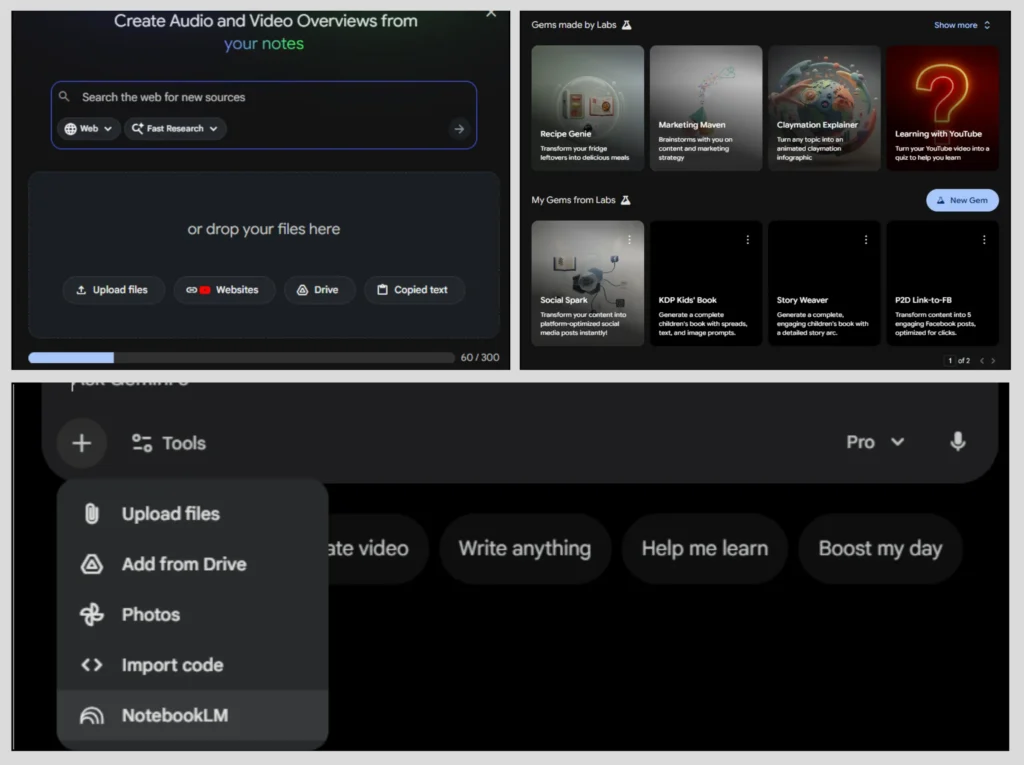
The output is grounded in real sources. No hallucinations. No invented statistics. Citations built in.
Adding Guardrails: Gemini Custom Gems
Here’s where it gets powerful. Inside Gemini, I create a custom “Gem”—essentially a specialized version of Gemini with instructions baked in.
In the Gem’s system prompt, I add:
- Brand voice guidelines (tone, vocabulary, rhythm)
- Content rules (what to avoid, what to emphasize)
- Citation requirements (how to format sources)
- Audience level (explain for beginners, assume marketing knowledge, etc.)
This keeps the AI anchored to my standards before it even starts drafting. It’s like hiring an assistant who already knows your style.
Real-Time Fact-Checking: Perplexity Over Google
Here’s a controversial take: stop using Google Search to fact-check. Use Perplexity AI instead.
Perplexity has a superior search engine that synthesizes live web results and gives you every source. No knowledge cutoff and hallucinations. Every claim links back to where it came from.
When you’re deep in the research phase, and you need to verify something like “What’s Upwork’s 2026 AI disclosure policy?”, Perplexity gives you the answer and the link. You don’t have to Google it yourself. The verification happens in real time.
The mindset shift: Think of Phase 1 as building a “knowledge architecture.” You’re not writing yet. You’re structuring understanding. The AI is your librarian. Your job is to read the library, ask questions, and decide what story to tell.
2: The “Ugly Draft” & Structural Planning
You’ve already done the hard part: the strategy is set, the research is solid, and you know the point you’re trying to make.
Now you’re staring at the blank page.
AI helps here, not because it can magically “write better than you,” but because it has zero fear of being wrong on the first try. In minutes, it can spit out dozens of possible hooks, outlines, and section orders, giving you options to react to instead of starting from nothing.
Breaking Writer’s Block: The Vomit Draft Approach
I use AI to generate what I call the “vomit draft.” It’s intentionally ugly, messy, repetitive, and full of filler and weak arguments. But it is a structure.
Here’s my prompt framework to generate the draft.
System Prompt (in Gemini‘s Custom Gem):
Your job is NOT to write polished content. Your job is to BUILD STRUCTURE.
When given a topic, you will:
1. Generate 3-5 completely different structural approaches
(e.g., problem-solution-success, chronological, hierarchical, journey-based)
2. For the structure I choose, create a detailed outline with:
– H1 (hook that answers the question in <15 words)
– H2s (clear benefit/problem statement in each)
– Bullet points under each H2 (NOT full paragraphs; just the ideas)
– Transition sentences between sections (I’ll rewrite these)
3. Include [RESEARCH NEEDED] tags where I need to add data
4. Include [PERSONAL EXAMPLE] tags where a human anecdote should go
5. Maintain this tone: [YOUR TONE DESCRIPTION]
The Outline Prompt:
The output isn’t draft-ready. It’s the scaffold.
The Persona JSON Strategy
Here’s a technique that changes everything: instead of writing tone guidelines in English prose, I create a JSON structure that defines the voice mathematically.
“persona”: “trusted-strategist”,
“audience”: “freelancers-with-some-ai-experience”,
“tone”: {
“formality”: 0.6,
“humor”: 0.4,
“urgency”: 0.5,
“authority”: 0.8
},
“vocabulary”: {
“prefer”: [“workflow”, “strategic”, “value”, “system”, “owner”],
“avoid”: [“unleash”, “delve”, “landscape”, “solution”, “leverage”, “best-in-class”],
“jargon_level”: 0.4
},
“sentence_structure”: {
“avg_length”: 15,
“short_sentences_ratio”: 0.3,
“complex_sentences_ratio”: 0.2
},
“opening_hooks”: [“statistic”, “confession”, “contrarian-take”, “personal-story”]
}
When I paste this into a chat in the Gemini app (with the NotebookLM’s notebook attached), the AI suddenly understands my voice, not as vague instructions, but as specific constraints.
The output is still draft-quality. But it sounds like me.
The “Don’t Copy-Paste” Rule
Here’s where many writers fall short: they generate an AI draft and ship it with light edits.
Don’t do this.
AI writing has a flatness to it. It’s not wrong, exactly. It’s just predictable. The sentences all have the same rhythm. The word choices are safe. The arguments follow the most obvious path.
A client who’s read 100 AI-assisted articles will feel this. They won’t be able to name it, but they’ll say, “This reads generic.”
That’s where Phase 3 comes in.
3: AI Text Humanization (Where 90% of the Value Lives)
You have a draft. It has structure, data, and covers the topic.
Now you have to make it interesting.
This is where you’re not an editor. You’re a renovator. You’re keeping the good bones and rebuilding everything else.
Spotting the Uncanny Valley of AI-generated Text
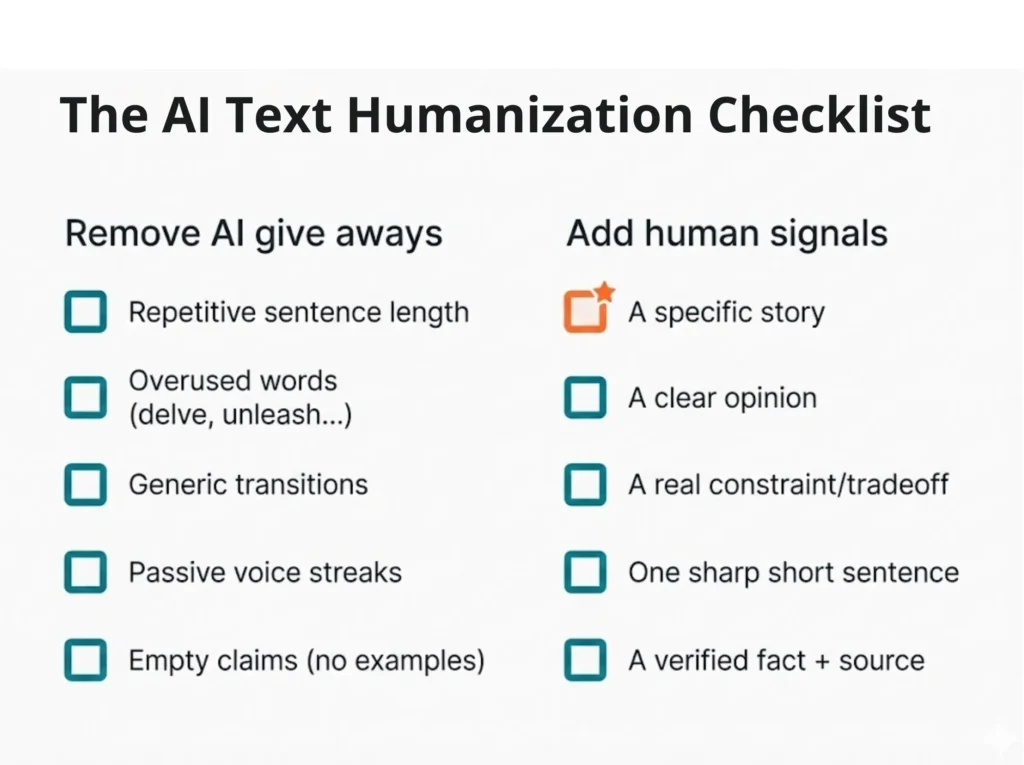
AI-generated text has its give aways. It has those linguistic patterns that stick out to readers who’ve seen enough of it.
Common red flags:
- Overused words: “unleash,” “delve,” “landscape,” “novel approach,” “at the end of the day,” “in today’s world.”
- Sentence uniformity: 18-20 word sentences, over and over.
- Passive voice creep: “It can be argued that…” instead of “Here’s why…”
- Fake hedging: “As mentioned earlier…” when nothing was mentioned.
- Generic transitions: “Another important factor is…” instead of specific, strong connections.
The edit phase is where you eliminate these giveaways.
Read your draft aloud. Your ear catches what your eyes miss.
The Sentence Variation Technique
AI tends toward a medium sentence length. Good writing mixes extremes.
Here’s my editing pass:
- Count sentences. If more than three consecutive sentences are 15+ words, break them.
- Insert short sentences. One to four words. These. Hit. Different.
- Combine short adjacent sentences into one longer one if it improves flow.
- Vary syntax. Don’t start every paragraph with “The.” Start with verbs. Numbers. Questions.
Injecting Lived Experience in Text: The Quality Signal
This is non-negotiable for writing texts that Google wants to rank in 2026. Google’s E-E-A-T framework (Experience, Expertise, Authoritativeness, Trust) now explicitly favors content that shows personal skin in the game.
AI cannot do this. It doesn’t have skin. It hasn’t lived a freelance business. It can’t fail at a client relationship and learn from it.
But you can. So, during your humanization pass, ask:
- Where can I add a specific failure? (“I thought I could just use ChatGPT’s output as-is. Cost me a client.”)
- Where can I show a unique insight? (Something you’ve only learned by doing this work 100 times)
- Where’s the emotional truth? (Why does this matter, beyond the productivity argument?)
These go in after the AI draft. They’re the signature that proves a human is the architect of this piece.
Internal AI Detection and Humanizing Tools for Text (and their Limitations)
Should you run your final draft through an AI detector before publishing?
Honestly, I do. I use tools like Winston AI for quick checks on long-form pieces. But here’s the truth: AI detectors have substantial false-positive rates. A perfectly human-written technical article might score as “40% AI” because it uses precise language. And a heavily edited AI draft might score as 10% AI because the variation broke the fingerprints.
Don’t use AI detectors as a pass/fail gate. Use them as one signal among many. If your piece scores high, go back and inject more personality. More short sentences. More human anecdotes. More opinions.
The real test: Would this read as AI to a human who knows your voice? If not, you’re done.
Related Reading: How to combine Winston AI and Stealthwriter to easily humanize AI text.
The Legal & Ethical Firewall Regarding Freelance Writing with AI
Here’s the hard truth nobody wants to say: content created solely by AI cannot be copyrighted in the United States.
If your client is paying you to own the IP, and the work is 100% AI-generated, that work is in the public domain. Anyone can republish it, and your client has no protection.
The moment you edit it substantially, it becomes copyrightable. The human authorship, including your edits, structure decisions, and anecdotes, is what grants copyright.
This matters legally and financially.
Contract Language: The AI Disclosure Clause for Freelance Writers
I always disclose AI use in every contract and project. Here’s the sample clause I use:
“This project might utilize AI-assisted tools (such as Google Gemini, NotebookLM, and Perplexity) for research synthesis, structural drafting, and fact-checking verification. All deliverables have been substantively edited, fact-checked, and strategically approved by the Writer prior to delivery. The Writer retains full responsibility for accuracy and brand voice compliance. AI tools are used as thinking partners, not content generators.”
This clause does three things:
- It’s honest. You disclose what tools you used.
- It’s protective. You claim your human contribution (edits, approval, fact-checking).
- It’s clear. The client knows what they’re paying for: your judgment, not the AI’s output.
There’s a difference between:
- Generative use: AI writes the article, you ship it. (Don’t do this. Not legally safe.)
- Assistive use: AI helps you research, draft, and brainstorm. You rewrite, verify, and approve. (This is defensible.)
Upwork, Fiverr, and Freelancing Platform Policy Changes (2026)
As of January 2026, Upwork updated its AI policies. Here’s what matters:
- You must disclose AI use in proposals. Not disclosing is grounds for account suspension.
- Use AI only in a way that matches the client’s expectations and any instructions they’ve provided. If the client hasn’t stated an AI preference, you can disclose your intended AI use and ask the client to confirm before proceeding. If the client requests “no AI,” treat that as a project requirement and don’t use AI for that work.
- Upwork has AI preference controls. You can now opt out of your work product being used to train Upwork’s AI models. So can your client. If either opts out, your work isn’t used for training. Check your settings now.
Fiverr has a looser approach: AI is allowed by default, but the buyer can require “no AI” in the project brief. That puts the burden on the client to ask, not on you to disclose.
My recommendation: Assume Upwork’s standard. Disclose, get permission, and document it in your first message to the freelancer or client.
People Also Read: How to Make Money with AI: The Ultimate & Proven Beginner’s Guide
The Client Conversation: Handling the “AI Detection” Question
Some clients will ask: “Is this AI-generated?”
Here’s how I answer:
“No. This is AI-assisted. I used AI to research, organize sources, and draft a structure. But every argument is mine. Every anecdote is mine. Every edit is mine. I ran it through fact-checkers and humanization passes. The output is designed, not generated.”
Most smart clients understand this distinction. The ones who don’t will trust you anyway. So clarify early.
Automation Beyond Writing: The Make.com Layer
Here’s what most freelancers miss: AI writing is only 30% of the efficiency gain. The other 70% comes from automating the admin work that surrounds it.
Think about your week. How much time do you spend on:
- Creating Google Drive folders for new projects?
- Logging deadlines into your calendar?
- Duplicating and editing invoices?
- Emailing invoices and payment reminders?
- Entering time logs?
Make.com is a visual automation platform that lets you automate all of this with no coding required.
Here’s what one freelance writer I know built:
- New project trigger: Client submits a form in Airtable with project name, deadline, and fee.
- Auto-creates: Google Drive folder → Google Calendar deadline → Xero invoice → sends to client via Gmail.
- Time saved: 40-60 minutes of manual work, now done in 0 seconds.
Scale that across 20 projects a month, and you’ve just reclaimed tens of hours a month. That’s time for more strategy, more humanization, more actual billable work.
The future: We’re moving toward agentic workflows, where AI doesn’t just assist with writing but manages tasks end-to-end.
Imagine: you submit a brief to an AI agent, and it researches, prompts you to draft, uploads to your client portal, creates an invoice, and sends a status email. All without you touching a keyboard. AI agents like Make.com make this possible.
Conclusion: The Human-in-the-Loop Is the Future
In 2026, the freelance writers who win are the ones using the most intentional AI workflows.
They understand that AI is brilliant at speed and structure but terrible at judgment, nuance, and trust. So they build workflows where AI does the thinking-intensive work (research, drafting) and humans do the judgment-intensive work (strategy, humanization, fact-checking).
This isn’t the death of freelance writing. It’s the evolution of it.
You’re no longer a “writer.” You’re a thinking partner and an information architect. You’re the human who knows why a client’s story matters and the strategy that makes it land.
AI accelerates that. It doesn’t replace it.
Start here: refine your own freelance AI writing workflow on just one project this month. Try the 10-80-10 rule. Use NotebookLM for research. Use Gemini (or your favorite AI) for drafting. Spend Phase 3 humanizing. Then measure: How much faster? How much better? How much more can you charge for the value you delivered?
>> To understand more about using AI in freelancing, read this article: A Guide for Freelancing with AI in 2026 and Beyond
Frequently Asked Questions (FAQs) About Freelance AI Writing Workflow
As a freelance writer, do I legally have to tell my clients I use AI?
Legally, it depends on your contract, but platform rules (like Upwork’s 2026 AI policy) require disclosure. Ethically, transparency is your safety net. I recommend an “AI Disclosure Clause” distinguishing between generative (writing) and assistive (research/editing) use to build trust and avoid future disputes.
If I use AI to draft an article, who owns the copyright?
In the U.S., purely AI-generated content is in the public domain. To transfer copyright to your client, the work must have “substantial human authorship.” Your strategic edits, personal anecdotes, and structural decisions are what make the work copyrightable and sellable.
How do I bill for a project that took 2 hours instead of 10?
Stop billing hourly immediately. Switch to project-based or value-based pricing. Your client is paying for a high-quality outcome and faster turnaround, not your time. If you use AI to work faster, that efficiency should increase your profit margin, not lower the clients’ bills.
Can I use AI for writing jobs on Upwork and Fiverr in 2026?
Yes, but with strict conditions. Upwork requires you to disclose AI use in your proposal. Fiverr allows it by default unless the client specifies “No AI.” Always check the client’s job post requirements first.