
How to Choose the Right AI Tools Stack That Actually Makes You Money (Ultimate Guide 2026)
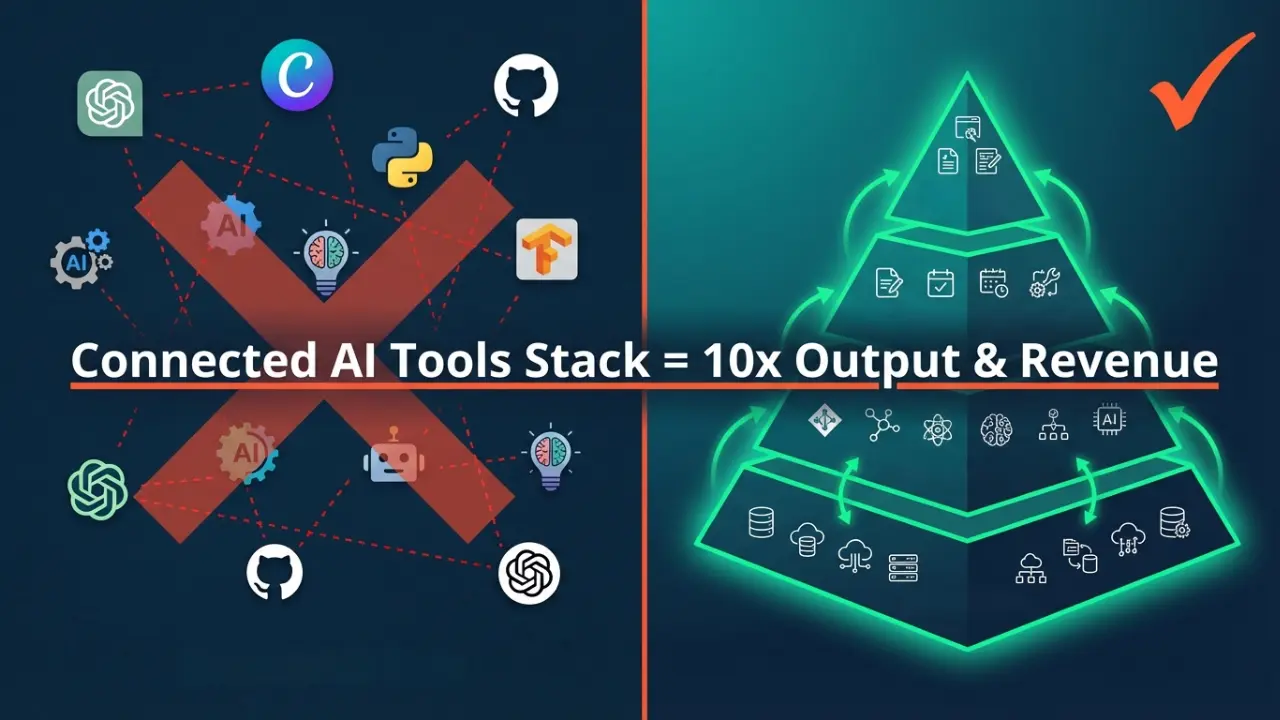
Choose the right AI tools stack, and you’ll 10x your output without hiring. Choose wrong, and you’ll burn $500+/month on subscriptions that don’t talk to each other.
For online business owners in 2026—from solopreneurs to small agencies—the game has changed. Having random AI tools isn’t enough anymore. You need a connected AI tools stack where your software works together like a team, not like strangers at a conference.
This guide shows you exactly how to choose the right AI tools stack for your business. You’ll learn which tools to buy, which to skip, and how to connect them so data flows automatically between intelligence, coordination, and action.
The best part? You don’t need a corporate budget to build this. You need a strategy.
Question: What Is an AI Tools Stack?
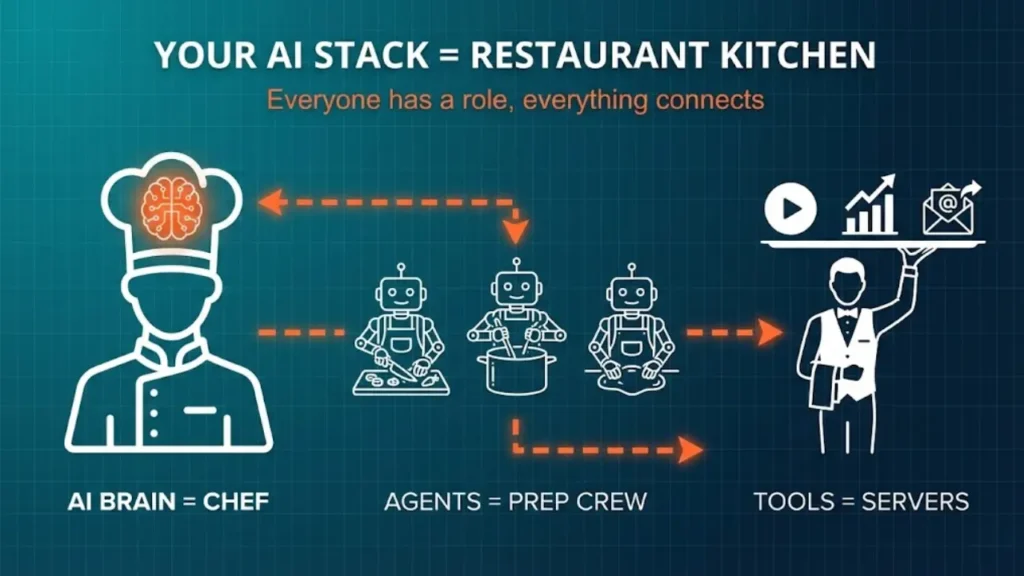
Direct Answer: An AI tools stack is a connected system of software that works together to automate your business tasks. It combines smart AI models (like ChatGPT), connection tools (like Make.com), AI workers (autonomous agents), and specialized apps (for video, design, or customer service). Unlike random subscriptions, a proper stack lets information flow automatically between tools to complete complex work—like qualifying sales leads or creating social media content—without you touching it. Think of it like a restaurant kitchen. You don’t just need a chef (the AI brain). You need prep cooks, dishwashers, and servers, all working together with clear roles. That’s your AI tools stack.
Why Most Businesses Choose the Wrong AI Tools Stack (And Waste Money)
Three mistakes kill most AI investments before they deliver results:
- Mistake #1: Tool Hoarding
You subscribe to 12 AI tools because they looked cool on Twitter. But they don’t connect. You spend more time copying and pasting between apps than actually working. - Mistake #2: Missing the Middle Layer
You buy ChatGPT and Canva but skip the orchestration layer—the system that connects them. Without this, you’re still doing manual work. You’re just doing it next to AI instead of with AI. - Mistake #3: No Clear Money Goal
You implement AI because everyone else is, without tying it to revenue or cost savings. After six months, you can’t prove if it’s working.
When you choose the right AI tools stack using the framework below, you avoid all three traps.
MUST READ: Make Money with AI in 2026: Ultimate Beginner Guide
The 4-Layer Framework: How to Choose Your AI Stack Architecture
To choose the right AI tools stack, stop thinking about individual apps. Think in layers. A profitable stack needs four distinct levels working together.
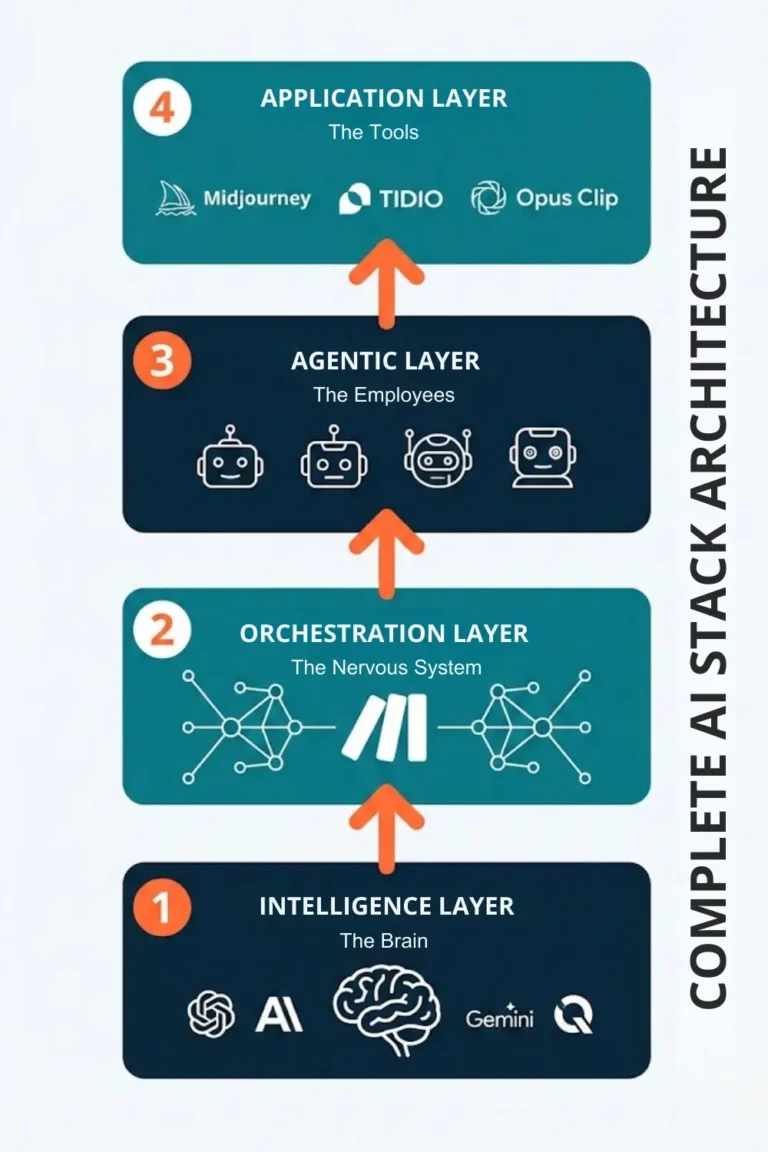
Layer 1: The Intelligence Layer (The Brain)
What It Does: This layer provides the raw thinking power. It processes information, reasons through problems, and generates content.
Best Tools:
- ChatGPT (latest model like GPT-5.2) by OpenAI – Best for general business tasks, content creation, and customer service
- Claude (latest model like Claude 4.5 Sonnet) by Anthropic – Superior for writing that sounds human, long documents, and nuanced tasks
- Gemini (latest model like Gemini 3.0) by DeepMind (Google)– Excellent for multimodal work (text + images + video)
- Qwen (latest model like Qwen 3) by Alibaba – Open-source option for custom development
When to Choose Which: For most online businesses, start with Claude for writing and ChatGPT for everything else, you can access both through their websites ($20/month each) or through APIs (pay only for what you use) accessed from their websites or from Centralized platforms for AI models like OpenRouter.
Cost: $20-40/month for subscriptions, or $10-100/month for API usage, depending on volume.
Layer 2: The Orchestration Layer (The Nervous System)
What It Does: This is the connector. It triggers actions, moves data between tools, and manages workflows automatically. This layer is what most businesses skip—and why their AI tools don’t actually save time.
Best Tools:
- Make.com – Visual workflow builder, best for beginners to intermediate users
- Zapier – Easiest to start, but gets expensive at scale
- n8n – Open-source option, requires some technical skill
- Gumloop – Newer player, great for AI-specific workflows
How to Choose: Start with Make.com. It offers the best balance of power, price ($29/month), and ease of use. It’s what we’ll reference throughout this guide.
Real Example: When a customer fills out your contact form, Make.com automatically sends their info to its Agent powered by ChatGPT to qualify the lead, adds qualified leads to your CRM, and schedules a follow-up email—all in 30 seconds.
Layer 3: The Agentic Layer (The Employees)
What It Does: These are AI workers assigned specific jobs. Unlike simple bots, agents can plan multiple steps, make decisions, and learn from your feedback.
Best Tools:
- Relevance AI – Build custom AI employees (Sales Agent, Research Agent, etc.)
- Lindy – an AI assistant that handles email triage and scheduling
- CrewAI – For developers who want to build agent teams
- Microsoft Copilot Studio – If you’re already in the Microsoft ecosystem
When to Add This Layer: Month 2-3 of building your AI tools stack. Start with Layer 1 and 2 first.
Cost: $29-99/month, depending on usage.
Layer 4: The Application Layer (The Specialized Tools)
What It Does: These are focused apps for specific outputs—video editing, image creation, customer chat, or code development.
Best Tools by Function:
| Function | Tool | Cost | Why Choose It |
| Image Creation | Nano Banana Pro | Integrated in Gemini Paid subscription tiers | Industry-leading quality |
| Video Editing | Opus Clip | $30/mo | Auto-creates short clips from long videos |
| Customer Chat | Tidio Lyro | $29/mo | Handles refunds, not just answers questions |
| Design | Canva AI | $15/mo | Templates + AI generation |
| Code Development | Cursor, Lovable, or Bolt.new | $20/mo | Code with natural language |
How to Choose: Only buy tools in this layer for tasks you do weekly. Don’t subscribe “just in case.”
How to Choose Between Buying and Building Your AI Stack
One of the biggest decisions when you choose the right AI tools stack is figuring out what to buy pre-built and what to build yourself using no-code tools.
When to Buy Pre-Built SaaS Tools
Buy for these situations:
- Common business functions – CRM (HubSpot), accounting (Xero), email marketing (Klaviyo). Don’t reinvent these.
- Specialized AI models – You can’t build something as good as Midjourney for images or Suno for music. Subscribe.
- Compliance-heavy needs – Payment processing (Stripe), data storage where security certifications matter.
Cost Consideration: Buying is faster to set up but costs more monthly ($29-99 per tool).
When to Build Using No-Code Tools
Build for these situations:
- Your competitive advantage – If you have a unique way to qualify leads or a specific content style, build a custom workflow in Make.com or an agent in Relevance AI. This creates a moat competitors can’t buy.
- Complex integrations – Connecting your legacy inventory system to your email platform? Build the bridge using n8n.
- Repetitive workflows unique to you – If you do the same 8-step process daily, automate it.
Cost Consideration: Building takes 10-20 hours upfront, but costs less monthly (just the orchestration platform fee).
Rule of Thumb: Buy for the 80% of tasks every business does. Build for the 20% that makes you unique.
How to Choose AI Stack Tools Based on Your Business Goals
Your AI tools stack selection must tie directly to money. We organize AI investments into three ROI tiers. Choose your stack based on which tier matters most right now.
Tier 1: Efficiency Stack (Save Money)
Goal: Cut costs by automating tasks you currently pay people to do.
How to Measure: Hours saved × hourly rate = monthly savings.
Example: Using Tidio Lyro to handle 80% of customer support tickets saves you from hiring a $3,000/month support person.
Choose These Tools:
- ChatGPT for answering emails
- Tidio or Gorgias for customer service
- Make.com to automate data entry
Who This Is For: Bootstrapped businesses spending too much on contractors.
Tier 2: Productivity Stack (Make More)
Goal: Increase how much you can produce with the same team (or just yourself).
How to Measure: Content pieces or deliverables per week.
Example: A solo content creator using Opus Clip + Claude produces 100+ social posts per week—work that normally takes a 3-person team.
Choose These Tools:
- Claude for writing
- Opus Clip for video repurposing
- Canva AI for design
- Make.com or n8n to connect them
Who This Is For: Agencies and creators who need to scale output without scaling headcount.
Tier 3: Transformation Stack (New Revenue)
Goal: Create entirely new revenue streams using AI.
How to Measure: Net new monthly recurring revenue.
Example: A consultant uses Gumloop to run automated AI Audits as a $500 productized service, generating $10K/month in new revenue.
Choose These Tools:
- Relevance AI to build custom agents
- Clay for lead enrichment
- Gumloop for delivery automation
- Make.com as the backbone
Who This Is For: Businesses ready to add new offers, not just improve existing operations.
Most businesses should start with Efficiency (Tier 1), prove ROI, then move to Productivity and Transformation.
AI Tool Stack for the Content Creator & Solopreneur
Business Goal: Build a one-person media empire. Create high-volume content with zero employees.
This stack turns one hour of your work into 40 hours of output across platforms.
Core Tools to Choose
| Function | AI Tool | Why Choose It | Cost |
|---|---|---|---|
| 1. Research | Perplexity Pro | Replaces Google. Validates content ideas instantly | $20/mo |
| 2. Writing | Claude Sonnet (API) | Best at sounding human, fewer “AI-isms.” | $15-50/mo usage |
| 3. Video Repurposing | Opus Clip | Auto-creates short clips from one long video | $30/mo |
| 4. Connection | Make.com | Your central nervous system | $29/mo |
| 5. Scheduling | Buffer | Posts content across platforms | $12/mo |
Total Monthly Cost: $106-146
People Also Read: 13 Reasons: Perplexity AI is the Best AI for Article Writing
The 10x Content Repurposing Workflow
Here’s how to choose the right AI tools stack configuration for content creation. This replaces a social media manager, video editor, and copywriter.
Step 1: You Create the Core Asset
Record one 30-minute video or write one deep newsletter. This is the only manual work you do.
Step 2: Automatic Processing (Make.com)
Upload the video to Google Drive. Make.com detects the new file and automatically sends it to Deepgram for transcription (5 minutes).
Step 3: Style Injection (Relevance AI)
The transcript goes to your AI Agent that has your Style Guide pre-loaded—your tone rules, phrases you love, words you never use.
Step 4: Multi-Format Creation
The Agent simultaneously:
- Writes a 1,500-word blog post
- Creates a 10-tweet thread
- Drafts a LinkedIn article
- Opus Clip identifies the five most engaging video moments and formats them for TikTok, Instagram Reels, and YouTube Shorts
Step 5: Human Review Gate
You receive a Slack notification with links to review everything. You spend 30-60 minutes editing and approving.
Step 6: Automated Publishing
Once approved, Buffer schedules everything across your social platforms over the next 7 days.
Result: One hour of your work becomes 15+ content pieces. That’s a 15x multiplier.
People Also Read: 11 Best AI Tools to Create an AI Influencers
AI Tools Stack for E-Commerce Business
Business Goal: Run an “always-open” store with 24/7 personalized service and automatic customer support.
E-commerce has different needs when choosing the right AI tools stack. You need inventory integration, payment processing, and instant customer service.
Core Tools to Choose
- Store Platform: Shopify (with Shopify Magic AI) – The ecosystem leader with the best AI integrations
- Customer Service Agent: Tidio Lyro or Gorgias AI – Not chatbots; real agents that process refunds and check order status
- Personalization Engine: Nosto – Changes homepage based on what each visitor clicks
- Email Recovery: Klaviyo AI – Predicts exact discount needed to convert without over-discounting
- Inventory Optimization: Inventory Planner – AI forecasting for stock levels
Total Monthly Cost: $129-299, depending on store size
The Conversational Commerce Workflow
Modern shoppers don’t just browse. They ask questions. Here’s how the right AI tools stack handle a real scenario.
11 PM on Saturday: A visitor asks, “Is the velvet sofa cat-proof?”
Your Stack Response:
- Tidio Lyro accesses your product knowledge base instantly
- Replies in 3 seconds: “Our velvet is durable, but for pet owners, we recommend the Microfiber Collection. It’s scratch-resistant and easier to clean. Here’s the link: [Product Page].”
- Nosto immediately updates the “Recommended for You” section to show pet-friendly throws and covers
- Klaviyo tags this visitor as “Pet Owner” for future campaigns about pet-safe furniture
The Result: 20-30% higher conversion rates because questions get answered instantly, and recommendations become smarter with every interaction.
AI Tools Stack for Agency & Service Business
Business Goal: Move from selling time to selling outcomes. Automate client acquisition and service delivery.
Service businesses face unique challenges when choosing the right AI tools stack. You need lead generation, client onboarding, and consistent service delivery.
The Outreach & Sales Stack
Don’t pitch “AI services.” Pitch solutions to specific problems using AI as your secret weapon.
Tools to Choose:
- Lead Finding: Clay – Enriches leads and finds trigger events (company just hired CMO, raised funding, etc.)
- Email Outreach: Instantly.ai – Manages campaigns at scale without landing in spam
- The Hook: Gumloop or Relevance AI – Run free “AI Audits” for prospects
The Winning Process:
- Clay identifies 100 companies that match your ideal customer profile
- You create a 30-second Loom video showing exactly where they’re losing money (AI-generated analysis)
- Instantly.ai sends personalized outreach: “I recorded a quick audit of your website. Thought you’d want to see this: [Loom link].”
- Response rates: 15-25% (versus 2-3% for generic cold email)
The Service Delivery Stack
Tools to Choose:
- Client Onboarding: Lindy – Handles inbox triage and meeting scheduling automatically
- Project Management: Notion + Make.com – When the client signs, Make.com creates their folder, sends an invoice via Stripe, and adds them to Slack
- Service Delivery: Depends on your service:
- SEO/Content: Perplexity for research + Claude for writing
- Web Development: Lovable.dev for rapid prototyping
- Design: Google’s Stitch
- Consulting: ChatGPT for analysis + Gamma.ai for presentations
Time Saved: 15-20 hours per week on admin and delivery.
Step-by-Step: How to Choose and Implement Your AI Tools Stack (90-Day Plan)
Don’t try to build your entire stack on day one. Here’s how to choose the right AI tools stack components in the right order.
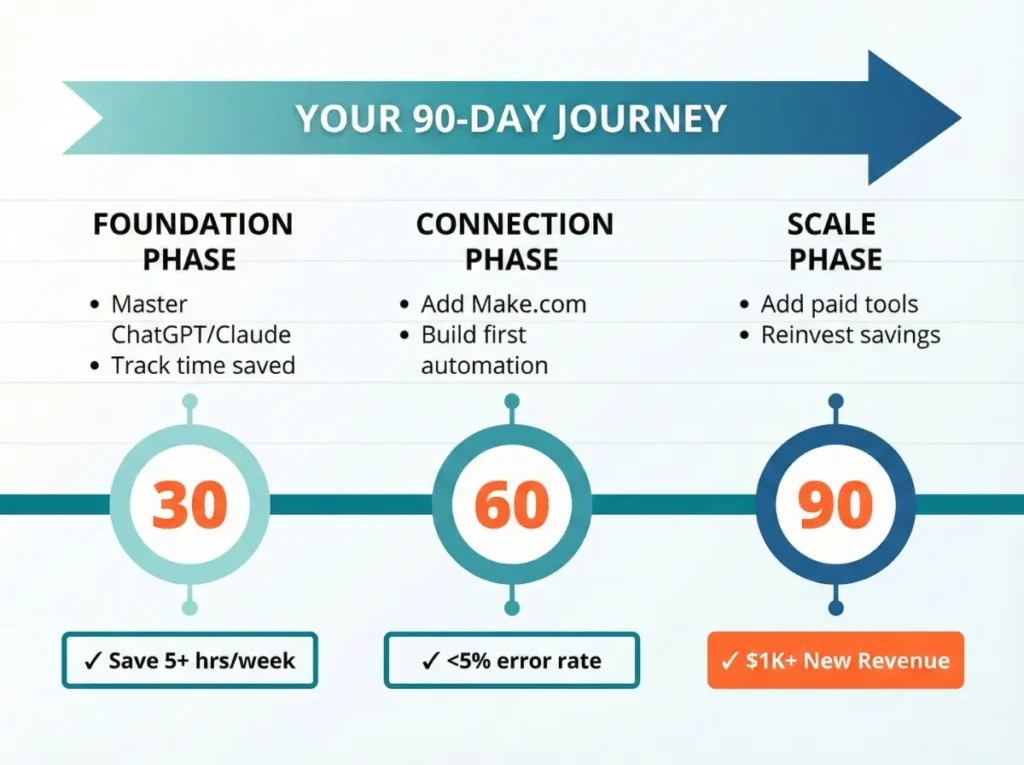
Days 1-30: Foundation Phase
Goal: Master the Intelligence Layer and prove one use case.
Choose These Tools First:
- ChatGPT Plus
- Claude Pro
Your Action Steps:
- Pick ONE specific problem to solve (customer service emails, content writing, or lead research)
- Spend 1 hour daily learning advanced prompting (use “Projects” features in both tools)
- Create 3 sample projects you can show
- Track time saved with a simple spreadsheet
Success Metric: Save 5+ hours in week 4.
Days 31-60: Connection Phase
Goal: Add the Orchestration Layer and create your first automated workflow.
Choose These Tools:
- Make.com
- One Application Layer tool based on your use case (Opus Clip, Tidio, or Clay)
Your Action Steps:
- Build your first 3-step automation (Example: New email → ChatGPT analysis → Add to spreadsheet)
- Let it run for 2 weeks and fix errors
- Add complexity: 5-step workflow that connects your CRM to your email tool
- Update your portfolio with “before/after” screenshots
Success Metric: One workflow running daily with <5% error rate.
Days 61-90: Scale Phase
Goal: Add specialized tools and generate your first AI-driven revenue or cost savings.
Choose These Tools Based on Your Tier:
- Efficiency Focus: Add Tidio or Lindy
- Productivity Focus: Add Opus Clip or Canva AI
- Transformation Focus: Add Relevance AI or Gumloop
Your Action Steps:
- Implement your Tier 1 stack from the sections above
- Run it for 30 days
- Calculate exact ROI
- Reinvest savings into one premium tool
Success Metric: Measurable $500+ monthly savings or $1,000+ new revenue.
Hidden Costs and Pitfalls When You Choose Your AI Tools Stack
Watch for these common traps that increase costs after you choose the right AI tools stack components.
1. API Usage Creep
The Problem: “Pay-as-you-go” pricing sounds cheap until a broken automation loop runs 10,000 times overnight.
The Fix: Set hard spending limits in your OpenAI and Anthropic dashboards ($50/month max until you understand usage patterns).
Real Example: A Make.com workflow with an infinite loop costs one business $800 in one weekend.
2. Maintenance Time
The Problem: AI tools break. APIs change. Models get updated, and your prompts stop working.
The Fix: Allocate 15-20% of your monthly budget for “maintenance hours”—either your time or hiring a developer on Upwork or Fiverr to fix broken workflows.
3. Model Training Costs
The Problem: Fine-tuning AI models to learn your specific business rules requires data labeling, testing, and updates. It’s not “set and forget.”
The Fix: For the first 6 months, use general-purpose models with good prompts instead of custom training. Only invest in fine-tuning after you’ve proven ROI with basic tools.
4. Integration Limitations
The Problem: Not every tool connects to everything. You might choose two perfect tools that can’t talk to each other.
The Fix Before You Buy:
- List your five must-have tools
- Check Make.com’s integrations page
- Confirm they all connect before subscribing
Security and Compliance: How to Choose AI Tools You Can Trust
When you choose the right AI tools stack for business use, data security matters—especially if you handle customer information.
Must-Have Security Features
Look for these certifications:
- SOC 2 Type II compliance (industry standard)
- GDPR compliance (required if you serve European customers)
- Data encryption at rest and in transit
- Option to opt out of model training
Tools with Strong Security:
- ChatGPT Team and Enterprise plans
- Claude Pro (Anthropic doesn’t train on your data)
- Make.com (SOC 2 certified)
What NOT to Do
Never upload to free AI tools:
- Customer payment information
- Personal health data
- Proprietary business strategies
- Confidential client information
Use Case Example: Need to analyze customer feedback? Remove names and email addresses before uploading to ChatGPT. Or use Claude Pro, which promises not to train on your conversations.
Conclusion
The gap between businesses that randomly use AI and those that choose the right AI tools stack is widening every week. Random tools give you a slight boost. A connected stack gives you market dominance.
You don’t need perfection. You need progress.
Your action for this week: Pick your biggest bottleneck—customer service, content creation, or lead research. Subscribe to one Intelligence Layer tool. Build one simple automation with Make.com, even if it just saves you 30 minutes. Run it for seven days.
That single workflow proves the concept. It funds the next tool. It builds your confidence.
The tools exist. The economics work. Your competitors are already building.
The only question left: will you start today or six months from now when they’re already ahead?
Frequently Asked Questions (FAQs): Choosing the Right AI Tools Stack
How much should I budget monthly to choose the right AI tools stack?
Start with $75-150/month (ChatGPT + Claude + Make.com + one specialized tool). Scale to $200-400/month as you add complexity.
Can I start with free tools?
Yes, but only for testing. Free tiers of ChatGPT, Make.com (1,000 operations/month), and Zapier work for learning. You’ll hit limits within 2-3 weeks of real use. Budget for paid plans from month 2.
Which AI tool should I choose first?
Claude Pro ($20/month) if you create content. ChatGPT Plus is available if you need general business help. Gemini Pro if you are looking for multi-modal options (for generating text, images, video, audio, and vibe coding)
How long until I see ROI?
Efficiency wins (cost savings): 30-60 days. Productivity wins (more output): 60-90 days. Transformation wins (new revenue): 90-180 days. Start with Efficiency to fund the others.
Do I need coding skills to choose and build an AI tools stack?
No. Tools like Make.com, Relevance AI, and Gumloop are visual—you drag and drop blocks. However, basic logic skills help (understanding “if this, then that” concepts).