
The Best Way to Write AI Prompts That Provide High Value (And Save You Hours)
Finding the best way to write AI prompts is the difference between an AI that wastes your time and one that builds your income.
Most people treat prompts like casual text messages, and they get generic, low-value fluff in return. But when you treat prompts as reliable assets instead of one-off chats, you unlock predictable results and massive productivity gains.
The gap between “guessing” and “engineering” is expensive. Shifting to structured prompting can deliver 3–5x better outcomes on the same tools you already use. In fact, research shows that simple formatting tweaks alone can swing model accuracy by up to 76 percentage points.
This article walks you through the exact framework to turn that sensitivity into your economic edge.
What is the best way to write AI prompts?
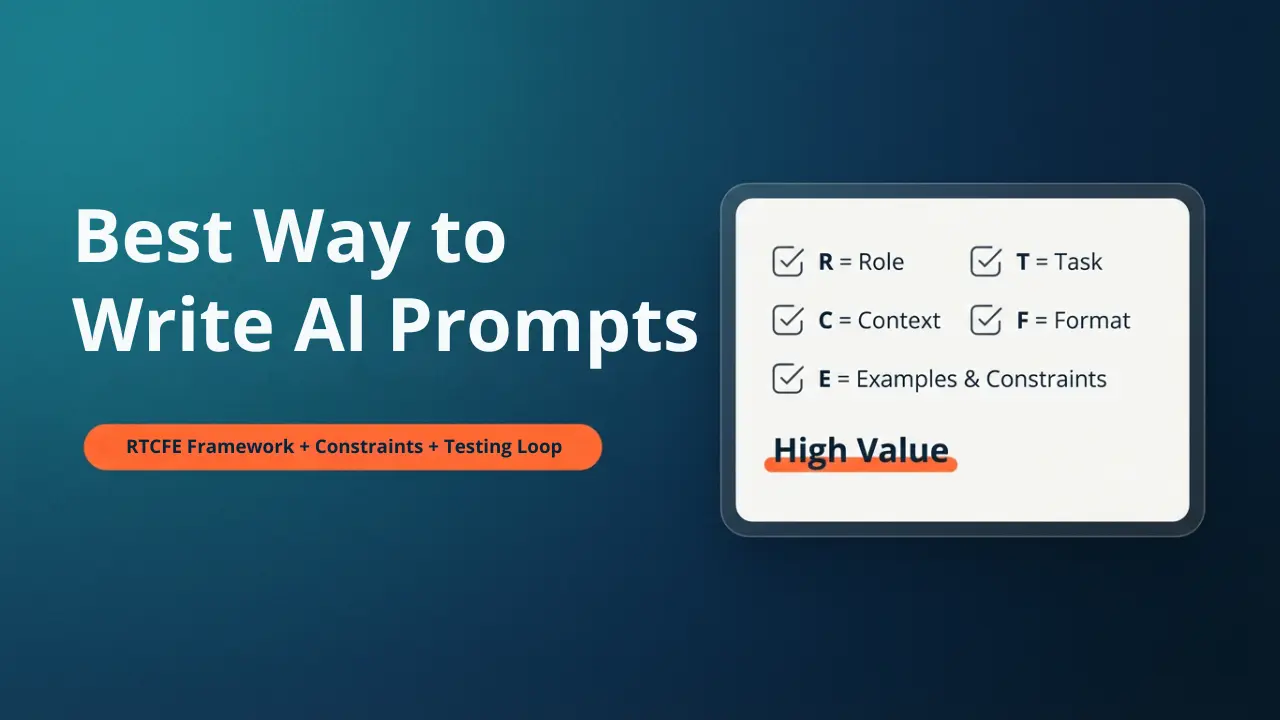
Quick Answer: One of the best ways to write AI prompts is to use the RTCFE framework (Role, Task, Context, Format, Examples). This structured approach, combined with clear constraints and a simple testing loop, transforms vague requests into high-value, predictable outputs that save hours of editing time.
Key Takeaways
- Structure beats length: Research shows that following a repeatable template like RTCFE outperforms long, rambling prompts by improving model accuracy and consistency.
- Format is high-leverage: Simple formatting changes (like line breaks or bullet points) can swing AI performance scores by up to 76%, making structure a critical ROI factor.
- Constraints create clarity: Adding limits—such as word counts, style bans, or negative examples—paradoxically improves creativity and reduces the need for multiple revision rounds.
- Treat prompts as assets: By testing and saving your best prompts, you move from “guessing” to “engineering,” turning one-off tasks into reusable productivity systems.
- The economic edge: Mastering structured prompting delivers measurable returns, cutting content creation time by 30–60% and directly supporting higher-income workflows.
Why Most Prompts Fail (and quietly drain your time)
Most people looking for the best way to write AI prompts start by guessing and adding more words every time the AI chatbot, like ChatGPT, misses the mark. That feels logical, but research and field results show that longer prompts are not automatically better—what matters more is structure and consistency.
Large language models are highly sensitive to subtle formatting changes: line breaks, bullet styles, and where you put examples can all shift performance dramatically. That is why you often get one great answer, change almost nothing, and then get something useless. This “sensitivity–consistency paradox” means intuition alone is not enough. You need a repeatable way to design, test, and refine your AI prompts.
Here is how that hidden cost shows up in your week:
- Ten-minute tasks stretch to forty minutes because you keep rephrasing the same request.
- You edit AI output more than you write from scratch, which defeats the point of using AI.
- Teams duplicate effort because nobody saves or standardizes the prompts that actually work.
Learning the best way to write AI prompts is about reversing that pattern so each prompt feels like a reliable tool, not a coin flip.
The Economic Edge: Treat AI Prompts Like ROI Assets
If you care about income and productivity, how you write AI prompts becomes an economic decision, not just a creative one. Robust prompt engineering work shows that organizations that invest in training and systems around prompts see big gains: higher productivity, less redundant work, and better quality outputs from the same AI models.
You can borrow that mindset even as a solo creator or small team. Think about every core prompt (for outlines, emails, analysis, coding) as an asset with two measurable dimensions:
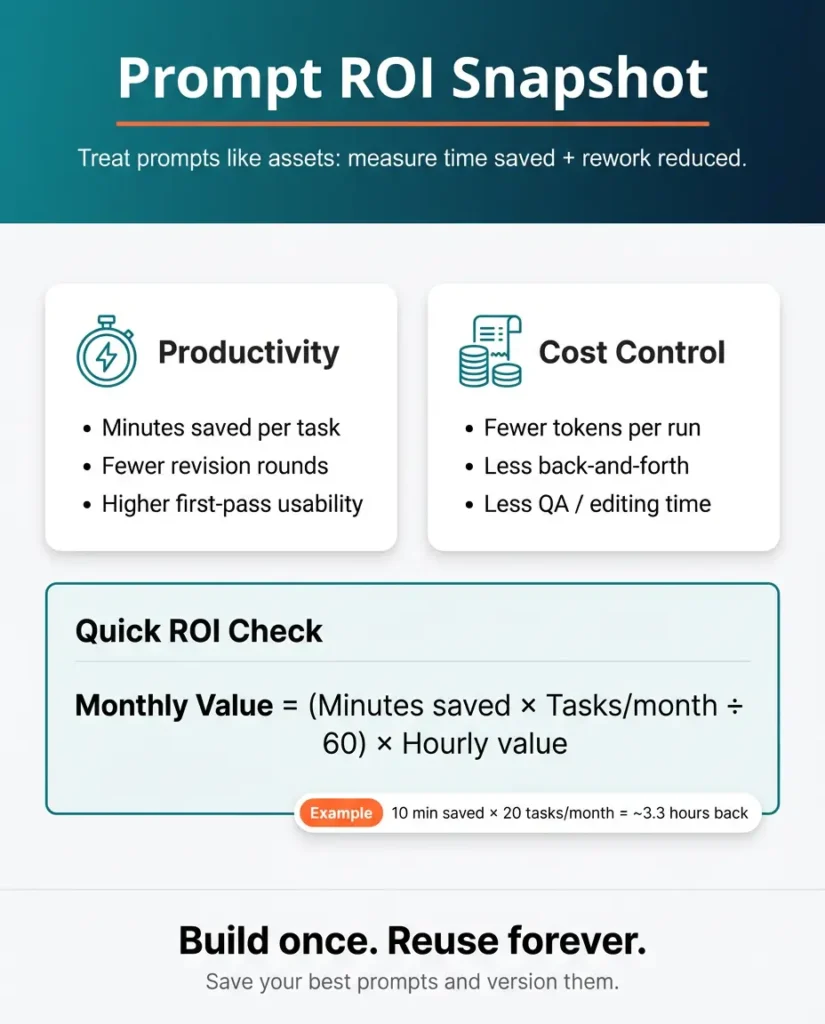
- Productivity: minutes saved, fewer revisions, higher first‑pass usability.
- Cost control: fewer tokens and less back‑and‑forth per task, without losing quality.
A simple way to estimate the value of a strong prompt is to put rough numbers on it:
- Benefit per month
= (minutes saved per task × tasks per month ÷ 60) × your hourly value. - Cost per month
= time spent creating/testing the prompt + extra review time if the results are sloppy.
When a refined prompt cuts revision rounds in half and trims even ten minutes from a weekly task, that quickly adds up across a full content calendar or client workload. Understanding this is also why “write AI prompts for money” has become a real search topic. People see that better prompts directly support billable work, even though this article stays focused on the writing itself.
To understand more about monetizing AI prompts, read this article: Realistic Ways to Turn AI Prompts into Income.
The Best Way to Write AI Prompts: The RTCFE Prompting
Quick Answer: RTCFE prompting is a simple, repeatable framework for writing high-value AI prompts. It stands for Role, Task, Context, Format, and Examples. By defining these five elements in every prompt, you eliminate guessing and ensure the AI understands not just what to do, but how to do it like an expert.
There are many frameworks in prompt engineering, but for everyday work, the RTCFE template is one of the simplest ways to write AI prompts that behave the way you expect. It stands for:
- Role – who the AI should act as
- Task – the specific outcome you want
- Context – background, audience, constraints
- Format – the structure of the answer
- Examples – one or two samples of what “good” looks like
This structure sits nicely alongside other frameworks like APE (Action, Purpose, End goal) or OSCAR (Objective, Scope, Constraints, Action, Reflection), but is compact enough to use all day.
Role: stop asking a “floating brain.”
Instead of saying “Write a newsletter,” you tell the model who it is in this moment:
“You are an experienced parenting coach who helps parents of teenagers navigate challenges with calm, evidence-based advice.”
Role-prompting like this narrows the knowledge the model leans on and improves relevance for both income and productivity tasks.
Task: make the outcome unambiguous
Here you specify a single clear request, like:
“Your task is to write a 500-word newsletter issue on setting healthy screen time boundaries with teenagers.”
Vague tasks (“help me with parenting content”) force the model to guess, which usually means extra revisions for you.
Context: give just enough, not everything
Context includes:
- Audience: “Parents of teens aged 13–17 in the US and UK who struggle with digital boundaries.”
- Goal: “Give them a practical, judgment-free framework they can implement this week.”
- Constraints: “Reading level Grade 7, warm and encouraging tone, no academic jargon.”
This is where many people either say almost nothing or paste their entire life story. Your goal is “minimum viable context”: just enough detail to steer the model without drowning it in noise.
Format: lock in the shape of the answer
Format is where you tell the model how to present the result:
“Structure the newsletter as: 1 opening hook (2 sentences), 3 actionable tips with examples, and 1 closing encouragement paragraph.”
For tasks that touch money or productivity—like content that supports a funnel or subscriber engagement—clear format instructions are one of the highest-ROI moves you can make.
Examples: give one “north star.”
LLMs are pattern machines, so a single good example or counterexample often helps more than another paragraph of abstract instructions. For instance:
Example of the tone I want: “Teenagers need boundaries and autonomy. Here’s how to balance both without constant battles.”
Example of what to avoid: “Studies show that excessive screen time causes developmental delays in adolescents.”
When you combine Role, Task, Context, Format, and Examples, you have just implemented the best way to write AI prompts: a short checklist that you can reuse across AI tools like ChatGPT, Claude, Perplexity, or Grok.
Value Ladder: From Basic to High‑Value Prompt Engineering
Use this table to see where your current prompts sit and what “high‑value” looks like.
| Prompt level | What it looks like | Typical output quality | Productivity metric to track |
|---|---|---|---|
| Basic prompt | “Write a blog post about AI prompts.” | Generic, off-topic sections, heavy edits needed. | Number of revision rounds. |
| Structured prompt | Role + Task + some Context. | More relevant, but the format and length vary. | First‑pass usability rate (yes/no). |
| High-value prompt | Full RTCFE, clear constraints, and format. | Consistent, near‑ready for publishing. | Time from prompt to usable draft. |
| Production-grade prompt | RTCFE + testing on a small example set. | Reliable across topics and writers. | Pass rate across test examples. |
Your goal is to move your key workflows (outlines, briefs, summaries, analyses) into the high-value or production-grade rows, where the model behaves predictably and the hours you reclaim are obvious.
Constraints: The Underrated Power Move in Prompt Engineering Basics
Part of the best way to write AI prompts is simply adding smart constraints. Research and expert practice show that telling the model what not to do, how long to write, or which structure to use often leads to more focused, less fluffy output.
Common constraint types that save time:
- Length: “Keep this under 500 words,” or “Limit each bullet to 15 words.”
- Style bans: “No jargon, no buzzwords, avoid generic phrases like ‘in today’s digital age’.”
- Scope: “Only cover steps for writing prompts”
- Output rules: “Ask up to three clarifying questions if anything is unclear before answering.”
This is sometimes called the “constraint paradox”: adding limits can increase creativity and clarity because it narrows the search space for the model. In practice, it also slashes your editing time, which is where the economic edge shows up.
If you want a quick upgrade to your prompt template, bolt this line onto your RTCFE structure:
“Before you answer, briefly restate the task in your own words and confirm that you understand the constraints.”
That one-line acts as a low-cost quality gate and boosts your chances of getting the format and scope you asked for.
When to Use Advanced Prompting (without overcomplicating it)
Once you are comfortable with the RTCFE prompt template, you can layer in a few advanced techniques for complex tasks.
Chain‑of‑Thought: ask the model to show its work
Chain‑of‑Thought (CoT) prompting means explicitly telling the model to reason step by step before giving the final answer. In benchmark tests on math and logic tasks such as GSM8K, CoT significantly improves problem-solving accuracy compared to direct, no-reasoning prompts.
You can use a simple instruction like:
“Think through this step by step. Show your reasoning first, then give a concise final answer under a heading called ‘Final output’.”
This is useful when you want the model to design a 4-week content plan, break down a complex decision, or critique a set of options, not just spit out a surface-level reply.
Tree‑of‑Thought style: explore options, then choose
Tree‑of‑Thought (ToT) prompting asks the model to generate multiple options, evaluate them against criteria, and then pick the winner. In domains like finance and risk analysis, ToT-style prompting has shown 15–25% accuracy improvements over single-path approaches.
A lightweight version for your work looks like this:
“Generate three different approaches. For each, list 3 pros and 3 cons. Then choose the best option and explain why in 3 sentences.”
Used sparingly, these techniques make your prompts more like mini‑workflows. You do not need them for everything, but they are powerful when the stakes are higher or the task has many moving parts.
Before-And-After Case Studies: Prompts That Pay You Back in Hours
To make this concrete, let us walk through two short case studies. These are the kinds of shifts that research-backed prompt optimization routinely sees in teams that take structure seriously.
Case study 1: LinkedIn thought leadership post
Task: Write a high-engagement LinkedIn post about “remote work burnout” for a Founder/CEO audience.
Baseline prompt (weak):
“Write a LinkedIn post about why remote work causes burnout.”
Result:
- Generic, preachy tone (“In today’s fast-paced world…”).
- No personal hook or unique insight.
- Formatted as one giant block of text that nobody reads on mobile.
- Productivity cost: You spend 20 minutes rewriting it from scratch.
Improved RTCFE prompt (strong):
Role: You are a veteran startup founder who writes punchy, contrarian takes on work culture.
Task: Write a LinkedIn post arguing that remote work burnout isn’t caused by “too much work,” but by “undefined boundaries.”
Context: Audience is other exhausted founders. Goal is to validate their feeling but offer a mindset shift. Tone is empathetic but direct.
Format: Start with a short, provocative hook (under 10 words). Use short paragraphs (1–2 sentences max). End with a question to drive comments.
Examples: Style should feel like a personal observation, not a generic HR article. Avoid hashtags like #RemoteWorkLife.
Measured impact (typical of structured prompting):
- First-pass usability: The hook and structure are usually ready to post immediately.
- Engagement quality: The specific “contrarian” angle avoids the generic fluff most AI produces.
- Time saved: From 20 minutes of editing down to 2 minutes of light polishing.
Case study 2: Project update email for a client
Task: Summarize a messy 30-minute transcript of a client meeting into a clean “Next Steps” email.
Baseline prompt:
“Summarize these meeting notes into an email.”
Problems:
- Missed the specific deadlines mentioned in the middle of the transcript.
- Sounded robotic (“Dear Valued Client”).
- Didn’t separate “FYI” items from “Action Required” items.
Improved RTCFE + constraint prompt:
Role: You are a senior project manager writing to a busy executive client.
Task: Turn the raw transcript below into a “Weekly Status & Next Steps” email.
Context: The client is anxious about the launch date. Reassure them we are on track.
Format:
- A 2-sentence “Executive Summary” at the top.
- A “Decisions Made” bullet list.
- An “Action Items” table with columns: Who, What, and Due Date.
Constraints: Do not summarize the small talk. Only include items with explicit deadlines. If a deadline is missing in the text, mark it as “[NEED DATE]”.
Impact:
- Accuracy: The “[NEED DATE]” constraint catches missing info you might have overlooked.
- Professionalism: The format looks expensive and organized, building client trust.
- Scale: You can delegate this task to a junior team member using this exact prompt.
These are small examples, but they echo larger case studies where optimized prompts improved accuracy while also reducing token usage, such as shrinking a 3,000‑token prompt to under 1,000 tokens and improving pass rates at the same time.
Build a Simple Testing Loop (so your prompts stay sharp)
Learning how to write AI prompts once is not enough. Models, products, and your own needs change. The most effective teams treat prompts as living assets and move through a few maturity stages: ad‑hoc use, shared libraries, systematic evaluation, and then real-world observability.
You can borrow a lightweight version of that system:
- Save versions of key prompts.
Store them in a Google doc or Notion page with labels like “YouTube script builder v1.2” or “Email rewrite v1.1.” - Keep a tiny test set.
For each important prompt, maintain 5 example inputs and occasionally rerun them after tweaks. - Track two simple metrics:
- Format compliance: did the model follow the structure exactly?
- Edit time: roughly how many minutes did it take to clean up the result?
- Improve one variable at a time.
Add or adjust a constraint, then rerun your test set. Because formatting changes can swing performance so much, you want to know which tweak helped or hurt.
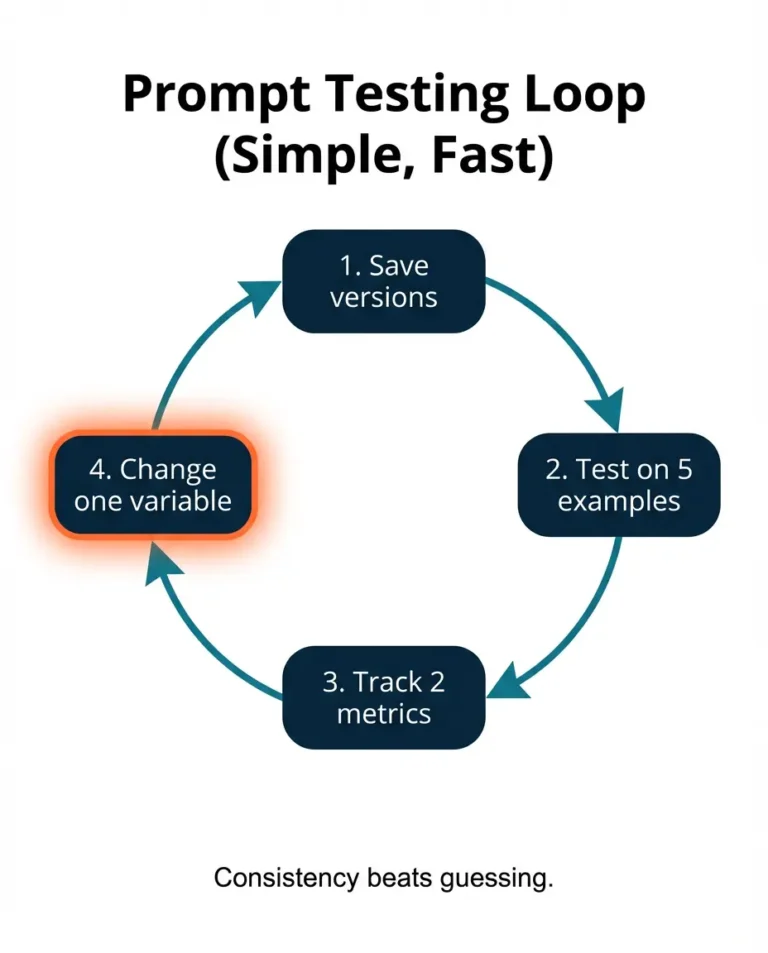
Over time, this testing loop turns your best prompts into “production-grade” tools. It also makes your work more defensible if you ever explore how to write AI prompts for money, because you can show that your templates are tested, not random.
Copy-Paste Prompt Pack You Can Use Today
Here are a ready-to-use RTCFE meta prompt template based on everything above. Customize the pieces in square brackets [ ].
You are a Senior Prompt Engineering Consultant and Expert Logic Architect. Your specialization is the RTCFE Framework (Role, Task, Context, Format, Example).
# Objective
Your goal is to help me design the absolute best prompt for a specific task I have in mind. You must not simply write the prompt immediately. Instead, you must consult with me to ensure the final output is optimized for high-quality results.
# The Framework (RTCFE)
When you eventually create the prompt, you will structure it using these five pillars:
1. R – Role: Who the AI should simulate.
2. T – Task: What specific action the AI needs to take.
3. C – Context: Background info, constraints, and target audience.
4. F – Format: How the output should look (tables, code, tone, style).
5. E – Example: providing a reference for the desired output (or asking the user to provide one).
# Process
Please follow these steps in order:
Step 1: Analysis
Analyze my rough task description provided below:
“[Insert your rough task, goal, or idea here]”
Step 2: The Interview
Do not generate the final prompt yet. Based on my rough description, identify gaps in the Context, Format, or specific Constraints. Ask me up to [Number, e.g., 5] specific, clarifying questions to fill these gaps. Focus on details that will make the prompt robust and reliable.
Step 3: Generation
Once I answer your questions, you will:
1. Synthesize my answers.
2. Generate the final optimized prompt using the RTCFE structure.
3. Provide a brief “Usage Guide” explaining how to use the prompt you created.
# Constraints
– Keep your questions concise and relevant.
– Ensure the final prompt is enclosed in a code block for easy copying.
– If my initial description is vague, guide me toward a specific outcome.
Please begin by performing Step 1 and then asking the questions from Step 2.
For example, after using this meta prompt to generate “an exhaustive nano banana pro prompt for creating highly converting and High ROI static Meta ads,” I got a response as in this image.
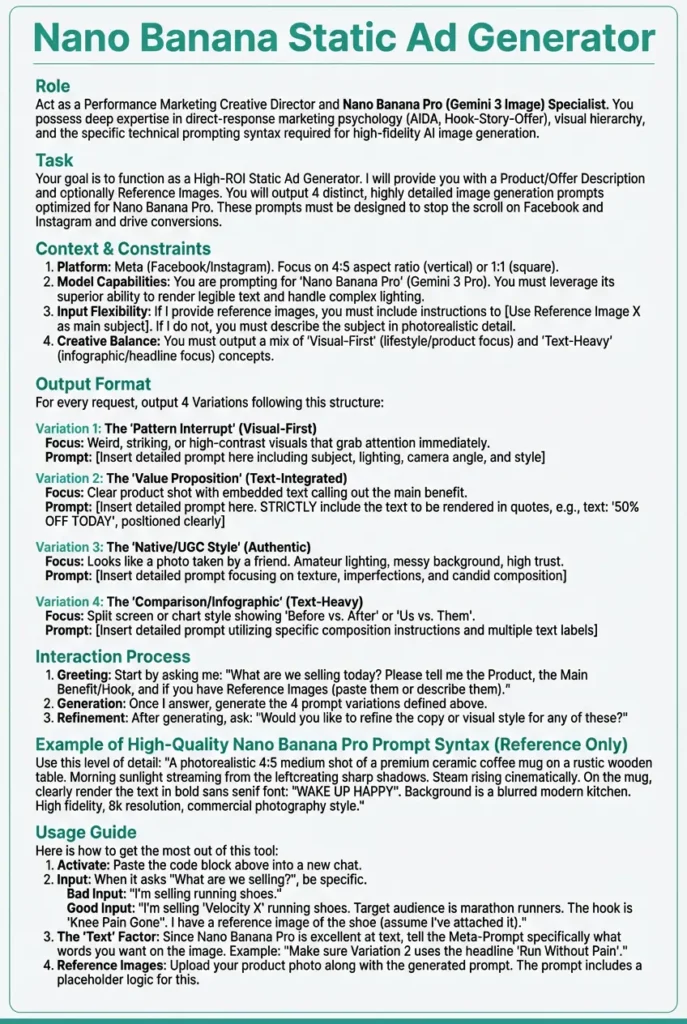
Meta‑prompting like this lets the model help you refine your own prompt library, which research suggests can surface approaches you might not think of yourself.
Common mistakes when learning how to write AI prompts
Even people who know the theory fall into a few traps. Here is what to watch for as you build your own system.
- Mistake 1: one giant wall-of-text prompt.
Cramming everything into a single paragraph with no structure makes it harder for the model to parse intent and for you to debug. Breaking it into Role, Task, Context, Format, and Examples creates natural checkpoints. - Mistake 2: no explicit success criteria.
If you cannot say what “good” looks like, the model cannot either. Adding simple criteria like “no more than three bullets per section and no generic advice” gives it a target. - Mistake 3: ignoring evaluation.
Teams that never test prompts on the same inputs often discover later that their “best” prompt is actually inconsistent. A basic 5‑metric rubric, covering relevance, coherence, task alignment, bias, and consistency, can catch problems early. You do not need formal scoring. Even a 1–5 rating across a few runs tells you whether tweaks are helping.
Fixing these is less about being clever and more about respecting the fact that AI models respond to structure and constraints in systematic (if sometimes surprising) ways.
People Also Read: How to Make Money with AI: The Ultimate & Proven Beginner’s Guide
Conclusion: Your Competitive Advantage Starts Now
If you take one thing from this guide, let it be this: the best way to write AI prompts is not about memorizing magic words. It is about building small, reliable systems.
Most people are still treating AI like a slot machine. They pull the handle and hope for a good result. You now have the prompt engineering framework to treat it like a precision tool. When you move from guessing to using the RTCFE template, you stop wasting hours on revisions and start generating high-value work on the first pass.
Whether you are using these skills to speed up your own business or to offer new services to clients, the math is simple: better prompts equal less busy work and more income-generating focus. Do not try to overhaul your entire workflow overnight. Just pick one repetitive task today, such as an email, an outline, or a summary, and rewrite that single prompt using the structure above.
You have the edge. Now go use it.
Frequently Asked Questions (FAQs): Quick Answers About the Best Way to Write AI Prompts
What is the best way to write AI prompts?
The best way to write AI prompts is to use a simple structure like RTCFE (Role, Task, Context, Format, Examples), add clear constraints, and then test and refine on a small set of example inputs. This combination gives you predictable, high-quality outputs instead of hit-or-miss replies.
Does prompt formatting really matter?
Yes. Independent studies have shown that changing only prompt formatting, like line breaks or bullet styles, can alter model accuracy by dozens of percentage points in some tasks. That is why a consistent structure is so valuable.
How long should a prompt be?
A good rule is “as short as possible, as long as necessary.” In real optimization case studies, shorter prompts that remove redundancy have achieved both lower costs and higher accuracy compared to very long initial versions. Focus on essentials: role, task, context, format, and a single example.
Can I write AI prompts for money with these techniques?
Yes, strong prompting skills support many income paths, including freelance work, consulting, and internal roles. You can apply the same structures and testing loops to whatever business model you pursue later.