
How to Sell AI-Generated Textures and Patterns (The 2026 Blueprint)
If you want to sell AI-generated textures and patterns successfully, you must shift your mindset from “artist” to “manufacturer.”
Let’s be real for a second: Generating a cool image in Midjourney or Nano Banana is easy. But turning that image into a reliable, passive income stream? That is where things get tricky.
If you have been browsing YouTube lately, you have probably seen the “get rich quick” tutorials claiming you can upload thousands of raw AI images to stock sites and retire early.
Spoiler alert: You can’t. The “easy money” era of 2023 is officially over. The market is currently flooded with low-effort noise, and buyers are tired of it.
But here is the good news. There is a massive, hungry market for high-quality, commercially ready assets. From game developers needing grunge textures for a post-apocalyptic wall to Etsy sellers looking for “cottagecore” floral backgrounds for wedding invites, the demand is real.
The secret isn’t just in the prompting—it’s in the polish.
This guide will walk you through exactly how to move from a “prompt engineer” to a “digital asset merchant,” ensuring your files are professionally upscaled, rigorously tested for seamless tiling, and formatted for high-value sales.
How Do I Sell AI-Generated Textures and Patterns?
Quick Answer: To sell AI-generated textures and patterns, focus on creating seamless, 4K+ assets that are upscaled, cleaned, and properly licensed for specific buyers like designers, game developers, and print-on-demand sellers.
What Are Commercial AI Textures?
What exactly sells?
Commercial AI textures are seamless, high-resolution (4000px+) digital assets engineered for specific utility in 3D modeling, game design, and print-on-demand (POD). Unlike raw AI art, which is often low-resolution and glitchy, commercial textures are mathematically tiled, color-corrected to remove baked-in lighting, and often include PBR (Physically Based Rendering) maps like Normal and Roughness channels.
To succeed today, you must understand the difference between “slop” and a “product.”
The “Raw vs. Refined” Trap: Why Most Sellers Fail
I hold a somewhat controversial opinion in this space: Midjourney is your quarry, not your sculptor.
When you generate a pattern in AI, you are extracting raw digital ore. It looks shiny, but it is often 72 DPI (too low for print) and might contain subtle “hallucinations”, like melted flower petals or seams that don’t align perfectly.
A creator on Creative Market recently shared a story that proves this point. They uploaded 500 raw AI patterns—straight from the bot to the shop—and made exactly $0. They pivoted, deleted the junk, and uploaded a single “Cottagecore Floral Pack” containing just 20 patterns. But this time, they spent two hours on each image, vector-tracing them and fixing seams. That single pack made $1,200 in the first month.
Here is the difference between what fails and what sells:
| Feature | Raw AI Output (Fails) | Commercial Ready Asset (Sells) |
| Resolution | Low (1024x1024px) | High (4000x4000px @ 300 DPI) |
| Edges | Often has visible seams | Perfectly seamless (Tested) |
| Lighting | “Baked” shadows (bad for 3D) | Flat / Albedo (neutral lighting) |
| File Type | Compressed JPG | Lossless PNG, TIFF, or SVG |
| Utility | Just an image | Organized, named, and pack-ready |
Step 1: Niche Selection and Prompting for “True” Seamlessness
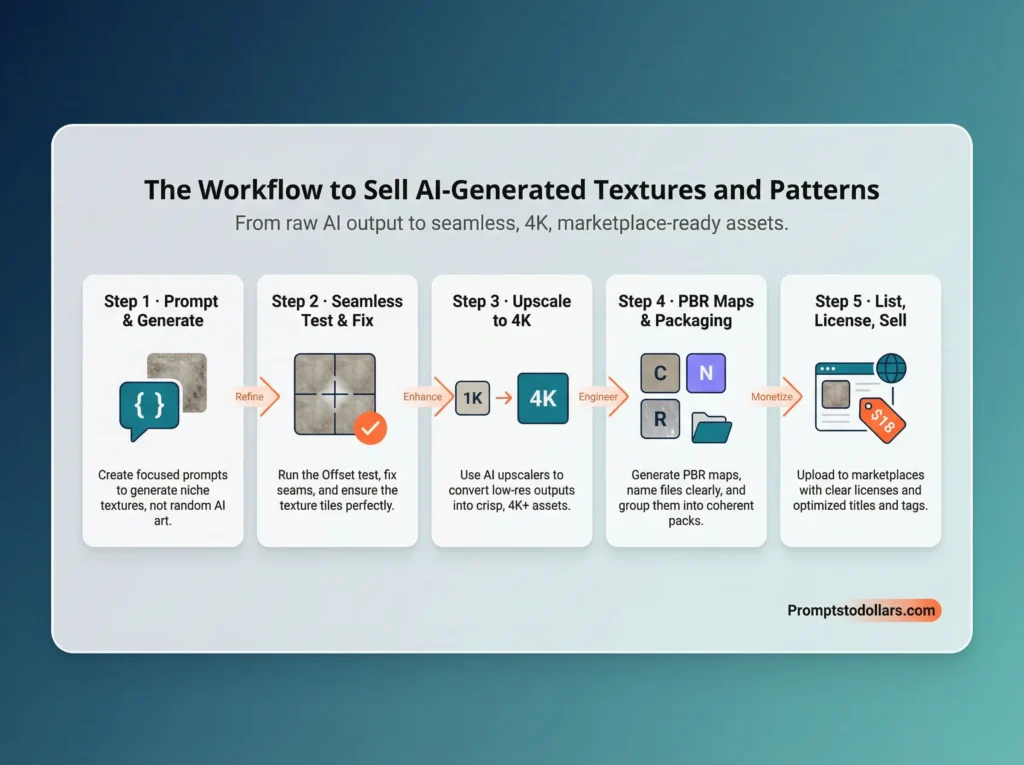
Stop prompting for “cool abstract patterns.” To sell AI-generated textures and patterns that actually move, you need to solve a specific problem for a specific buyer.
The “Volume vs. Value” Matrix
Before you generate a single pixel, decide who you are selling to.
- The Crafter (Etsy): Wants cute, thematic backgrounds (e.g., “Boho Nursery,” “Vintage Christmas”). They value aesthetics over technical specs.
- The Pro Designer (Creative Market): Wants high-res, editable assets. They value time savings.
- The Game Dev (Unreal/Unity Store): Wants PBR-ready materials (concrete, wood, metal). They value technical accuracy (does it tile? does it have a normal map?).
The Prompting Strategy
Once you pick a niche, you must force the AI to understand tiling geometry.
- For Midjourney: You must add the –tile parameter to the end of your prompt.
I also noticed that by adding the ‘–tile parameter’ to your prompt in other state-of-the-art AI image generators like Nano Banana, of GPT Image, they will generate perfect patterns.
Try this prompt structure for a high-value asset:
Vintage William Morris floral wallpaper texture, intricate details, sage green and cream, flat vector style, no shadows –tile ar 3:4
Pro Tip: Avoid “complex scenes” in patterns. Focus on textures (concrete, marble, silk) or motifs (flowers, geometric shapes). These are “evergreen” assets that designers buy repeatedly.
Step 2: The “Offset Test” (The Quality Filter)
This is the step 90% of sellers skip. If you want to build a reputation that allows you to charge premium prices, you cannot skip this.
Even if AI claims an image is “seamless,” it often leaves tiny, ghost-like artifacts at the edges. If a designer buys your pack, tiles it on a website background, and sees a faint line every 1000 pixels, they will refund it immediately.
Here is the exact workflow to fix it:
- Open in Photoshop: Load your generated texture.
- Offset It: Go to Filter > Other > Offset.
- Shift: Shift the image by 50% horizontally and 50% vertically. This moves the “seams” (the edges) to the dead center of the image.
- Zoom In: Look closely at the center cross. Do you see a weird line? A cut-off flower? A color mismatch?
- Fix It: Use the Spot Healing Brush or Generative Fill to blend that seam until it vanishes.
If you do this, you can guarantee Verified Seamless in your product description, which is a massive trust signal for buyers.
Step 3: Upscaling for Print and Pro Use
Most standard AI output is typically 1024×1024 pixels. At standard print resolution (300 DPI), that image is only 3.4 inches wide. That is useless for a shower curtain, a dress, or a 4K game environment.
You must upscale your textures to at least 4000×4000 pixels.
The Tools
- Raster Upscaling (For Photos/Textures): Use AI upscaler tools like Magnific AI. These tools don’t just stretch the pixels; they introduce new details to keep lines crisp even when printed on a king-size duvet.
- Vectorizing (For Patterns/Graphics): If you are selling to print-on-demand entrepreneurs, they love SVG (Scalable Vector Graphics) files because they can be scaled infinitely without pixelating. Use tools like Kittl AI or the “Image Trace” feature in Adobe Illustrator to convert your high-res raster image into a vector.
Step 4: The “Value Multiplier” – Generating PBR Maps
If you want to move from selling $5 packs on Etsy to $30 materials on the Unreal Engine Marketplace, you need to understand PBR (Physically Based Rendering).
Game developers don’t just paste a picture of wood onto a floor. They need the engine to know how light bounces off that wood. To do this, they need “Maps”—black and white images derived from your original texture.
- Normal Map: Purple/Blue images that fake 3D depth and bumps.
- Roughness Map: Black and white images that define shiny vs. matte areas.
- Displacement Map: Height data that actually changes the 3D geometry.
How to do it:
You don’t need to be a 3D wizard. Use free tools like Materialize or paid tools like Adobe Sampler. Drag and drop your seamless, upscaled texture into these tools, and they will generate the maps for you.
By including these files, you aren’t just selling a “picture of wood”; you are selling a “Next-Gen Wood Material.” This triples your potential price point.
People Also Read: The Blueprint for Easy AI Side Hustle: Building Digital Products for Passive Income
Common Challenges in Selling AI-Generated Textures and Patterns
When you try to sell AI-generated textures and patterns, you will hit walls. Here are the three most common quality issues that cause rejections and bad reviews, and how to solve them.
Challenge 1: The Grid Effect (Visible Repetition)
The Issue: When a texture tiles, a distinctive mark (like a unique knot in wood or a bright red rose) repeats noticeably, creating a visible “grid” pattern that looks fake.
The Fix: Use “High-Frequency Removal.” Open your texture in Photoshop and edit out any “hero” details that stand out too much. Good textures are somewhat generic, so they blend into the background.
Challenge 2: Inconsistent Lighting
The Issue: The AI generates shadows within the texture (e.g., a shadow under a rock). This ruins 3D scenes because the texture’s shadow might conflict with the game engine’s actual light source.
The Fix: Prompt for “flat lighting,” “de-lit,” or “albedo texture.” If shadows appear, use an equalization filter in post-production to remove light directionality.
Challenge 3: Platform Rejection
The Issue: Marketplaces like Adobe Stock are rejecting items due to “Quality Standards” or “AI Spam.”
The Fix: Curated Packs. Never upload hundreds of single files. Curate the best 10, clean them manually, and bundle them. Quality control is your only defense against rejection.
Choosing Your Marketplace Strategy
Where you sell is as important as what you sell.
1. Adobe Stock (The Volume Play)
- Strategy: Upload individual, high-utility textures. Tag them accurately.
- Pros: “Set and forget.” Huge traffic.
- Cons: Low earnings per download (cents). Strict AI labeling rules.
2. Creative Market / Envato (The Premium Tier)
- Strategy: Create “Themed Packs” (e.g., “50 Distressed Sci-Fi Metals”).
- Pros: High ticket sales ($15 – $35 per pack). Professional buyers.
- Cons: Hard to get accepted. You need a portfolio.
3. Etsy (The Niche Play)
- Strategy: Sell “Digital Paper” packs for specific crafts (scrapbooking, junk journaling).
- Pros: Huge traffic for “cute” aesthetics.
- Cons: High competition. Requires heavy marketing on Pinterest and customer service.
Related Reading: 20 Best Platforms to Sell Your AI Artwork Online
Conclusion: Stop Generating, Start Curating
The window to make easy money by spamming thousands of mediocre AI images is closed. Good riddance.
The window to build a legitimate digital asset business using AI as your tool is wide open. The creators who win in 2026 will be the ones who treat AI like a raw material mine—extracting the ore, refining it, polishing it, and selling the gold.
You don’t need to upload 100 mediocre images today. You need to upload 5 perfect ones. Your bank account—and your customers—will thank you.
People Also Read: How to Make Money with AI: The Ultimate & Proven Beginner’s Guide
Frequently Asked Questions (FAQs) on Selling AI-generated Textures and Patterns
Can I copyright AI textures?
Currently, in the US, purely AI-generated art cannot be copyrighted. However, if you significantly alter the work (like vectorizing, heavily editing, or combining elements in Photoshop), you may claim copyright on your human modifications. Always check local laws.
Do I need to disclose AI usage?
Yes. Platforms like Etsy and Adobe Stock now require you to tag listings as “Created with AI.” Hiding this can lead to account suspension and anger customers. Transparency builds trust.
What resolution is best for selling?
For “Digital Paper,” the standard is 12×12 inches at 300 DPI (3600×3600 pixels). For professional textures, aim for 4096px (4K) on the shortest side.