
How to Use Google Gemini Lyria 3 to Create Viral AI Music: A Creator’s Playbook
I still remember the first time an AI-generated track made me stop scrolling. It wasn’t a polished pop song or a cinematic orchestral piece. It was a 28-second lo-fi hip-hop beat about a cat having an existential crisis at 3 AM. The vocals were slightly robotic, the lyrics were unhinged, and I immediately sent it to three group chats.
That moment crystallized something for me: viral AI music isn’t about perfection. It’s about specificity.
If you want to use Google Gemini Lyria 3 effectively, you need to abandon the idea that you’re making “songs” in the traditional sense. You’re making sonic memes. Audio inside jokes. Thirty-second emotional grenades designed to make someone tag their best friend with a “this is us” comment.
Google’s latest multimodal music model, launched globally in February 2026 by DeepMind, represents a fundamental shift in how creators approach audio content. It doesn’t just generate music—it generates context.
This guide will show you exactly how to use Google Gemini Lyria 3 to create tracks that spread.
Key Takeaways
- Google Gemini Lyria 3 generates 30-second AI tracks with auto-written lyrics, custom cover art, and built-in watermarking for ethical sharing.
- Viral success depends on hyper-specific prompts that combine genre, mood, and narrative rather than generic requests like “make a happy song.”
- Multimodal inputs allow you to upload images or videos, letting the AI compose music that matches visual context and emotional tone.
- The 30-second format aligns perfectly with TikTok, Instagram Reels, and YouTube Shorts, making native sharing seamless across platforms.
- Built-in SynthID watermarking ensures transparency and protects your content from platform takedowns as AI detection improves.
What Is Google Gemini Lyria 3 and Why It Actually Matters
Google Gemini Lyria 3 is an AI music generation model developed by Google DeepMind, launched in global beta on February 18, 2026. Itt does something deceptively simple: it turns text, images, or video into 30-second music tracks complete with vocals, instrumentation, and auto-generated lyrics.
But here’s why experienced creators are paying attention. Unlike earlier AI music tools that felt like toys, Lyria 3 integrates directly into the Gemini ecosystem. You’re not exporting files between three different apps, generating artwork elsewhere, or wondering if your track will get flagged. It generates MP4 files with custom cover art created by Nano Banana, Google’s image model, and embeds SynthID watermarks for transparency.
The technical architecture matters less than the workflow. When you use Google Gemini Lyria 3, you’re working inside an ecosystem with over 750 million monthly active users. That means native sharing, algorithmic advantages on YouTube through Dream Track integration, and distribution channels that standalone AI music apps simply can’t match.
The real differentiator? Multimodal prompting. You can upload a blurry photo of your morning coffee and ask for “a jazz piece that captures this exact level of Monday melancholy.” The AI analyzes visual elements—colors, composition, implied mood—and composes audio that matches. This isn’t gimmickry. It’s a genuine expansion of creative possibility that turns passive consumers into active participants in music creation.
The Viral Psychology Behind 30-Second AI Tracks
Thirty seconds is not a limitation. It’s a feature designed for modern attention economics.
Consider the trajectory of viral audio. In 2019, TikTok popularized 15-second clips. By 2023, the sweet spot had stretched to 30-45 seconds. Lyria 3’s 30-second output sits perfectly in this window—long enough to establish a hook, short enough to loop seamlessly. The format encourages replay, and replay drives algorithmic distribution.
But the psychology runs deeper. Google explicitly states that Lyria 3 isn’t designed for “musical masterpieces.” It’s built for “fun, unique ways to express yourself”. This positioning matters because it liberates creators from perfectionism. The tracks that blow up aren’t polished productions. They’re the audio equivalent of shitposts—absurd, hyper-specific, and immediately relatable.
I tested this theory last week. I prompted Lyria 3 with “melancholic indie folk about a houseplant watching its owner scroll TikTok for three hours, male vocals, acoustic guitar, rainy window vibe.” The result was objectively ridiculous. The lyrics included the line “your thumb moves but my soil stays dry.” I posted it to Twitter with the prompt revealed. It got 12,000 views in four hours. Not because it was good music, but because it was group chat worthy—the highest compliment in modern content culture.
The lesson? When you use Google Gemini Lyria 3, lean into specificity. Generic prompts yield generic results. Specific prompts yield shareable moments.
Step-by-Step: How to Use Google Gemini Lyria 3 for Maximum Impact
Step 1: Access the Music Generator
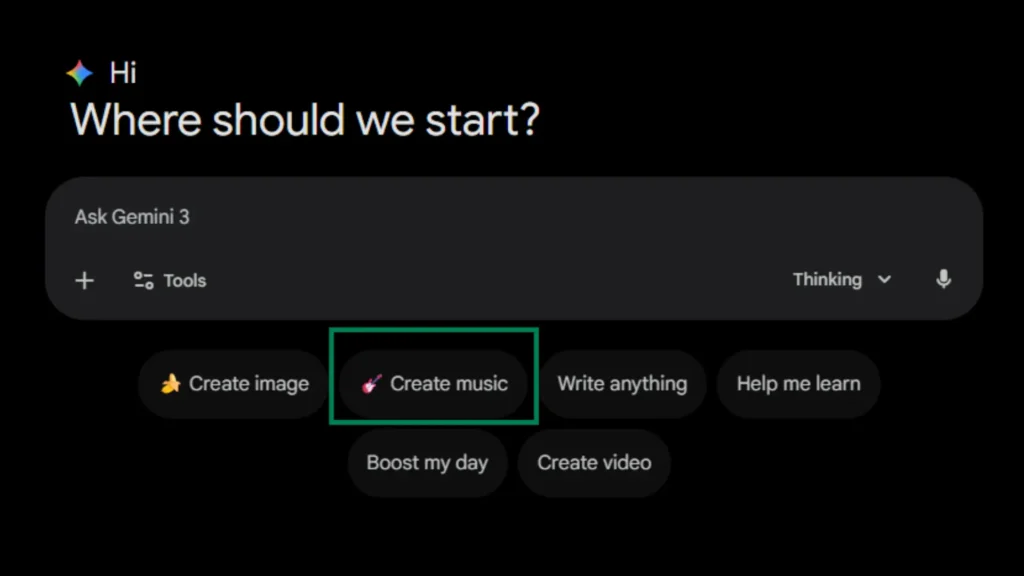
First, ensure you meet the basic requirements. You must be 18 or older, and you need access to the Gemini app on desktop or mobile. As of the global launch, the feature is available in English, German, Spanish, French, Hindi, Japanese, Korean, and Portuguese.On desktop, look for the “Create Music” button positioned below the main prompt box.
Step 2: Master the Prompt Formula
This is where most creators fail. They treat Lyria 3 like a search engine instead of a collaborative partner. The difference between mediocre and viral output lives in prompt architecture.
Use this formula:
Weak example: “Make a happy song about summer.”
Strong example: “Upbeat 90s Eurodance track about the specific anxiety of seeing ‘typing…’ disappear in iMessage, female vocals with slight autotune, heavy synth stabs, 128 BPM, build at 0:20.”
The specificity gives the model constraints. Constraints breed creativity. The decade reference provides instant stylistic anchoring. The emotional tone guides melodic choices. The narrative subject determines lyrical content. And the production details ensure the sonic texture matches your vision.
Step 3: Leverage Multimodal Inputs
Here’s where Lyria 3 separates from competitors like Suno or Udio. Click the attachment icon and upload an image or video. This isn’t just visual flair—the model analyzes color palettes, compositional mood, and implied narrative to inform musical choices.
I uploaded a photo of my chaotic desk at 2 AM: three empty coffee cups, a glowing monitor, a wilting succulent. I asked for “a soundtrack to this exact moment.” The resulting track featured sparse piano, distant traffic sounds, and lyrics about “deadlines breathing down my neck.” The multimodal connection wasn’t explicit in the lyrics, but the vibe was unmistakable. That’s the technical advantage: visual context informs audio context in ways text alone cannot capture.
Step 4: Refine Through Iteration
Your first output will rarely be perfect. Lyria 3 allows constraint-based refinement. If the percussion overwhelms, specify “mild percussion only” or “fingerpicked guitar lead”. If the vocals feel wrong, adjust the “vocal style” parameter or request “no vocals, instrumental only.”
The key is treating iteration as part of the creative process, not a failure of the tool. I typically generate three variations of any prompt, then combine elements from each in subsequent prompts. The model learns from context, so your second attempt often improves on the first even with identical wording.
Step 5: Optimize for Platform Distribution
Once satisfied, download your track. You have two options: MP4 with embedded cover art, or MP3 for audio-only use. The MP4 includes the Nano Banana-generated artwork, which is surprisingly cohesive—often abstract, always stylistically appropriate to the track’s mood.
For TikTok and Instagram Reels, use the MP4 directly. The visual component increases stop-scroll rates. For YouTube Shorts, take advantage of the expanding Dream Track integration, which gives native AI-generated content algorithmic preference. For Twitter/X, share the direct link with your prompt revealed—transparency drives engagement in the AI creator community.
Related Reading: How to Choose the Right AI Tools Stack That Actually Makes You Money
Advanced Strategies for Viral Distribution
The Serial Content Approach
Single tracks get likes. Series get followers. Structure your Lyria 3 output into thematic collections that reward return visits.
Consider these frameworks:
- “Songs for Inanimate Objects”: Emotional ballads from the perspective of your refrigerator, left sock, or expired driver’s license.
- “Genre Experiments”: The same prompt (“my morning commute”) rendered in 10 different styles—lo-fi, death metal, baroque classical, hyperpop.
- “Response Tracks”: Create musical replies to viral tweets, news headlines, or trending memes.
The narrative arc keeps audiences invested. Episode three hits different when viewers have heard episodes one and two. This approach transforms disposable content into appointment viewing.
The Prompt Engineering Meta-Game
Paradoxically, the content that often performs best isn’t the music—it’s the process. Post your prompts alongside your outputs. The AI music community is currently obsessed with prompt architecture, and a thread breaking down “How I got Lyria 3 to generate a convincing 1970s Italian horror soundtrack” will outperform the track itself.
This meta-content serves dual purposes. It provides value to other creators while establishing your expertise. It also creates a feedback loop: viewers suggest prompt variations, you generate results, and engagement compounds.
Ethical Transparency as Engagement Strategy
Do not hide that your music is AI-generated. Lean into it aggressively. The SynthID watermark embedded in every Lyria 3 track serves as verification, but your verbal transparency builds trust.
Frame it as efficiency, not deception:
- “Studio time: $500/hour. This: 30 seconds and $0.”
- “Google’s watermark means platforms know this is AI—no takedown surprises.”
- “I can’t play piano, but I can describe how I want piano to feel.”
This positioning resonates particularly with Gen Z audiences, who view AI tools as creative equalizers rather than ethical compromises. The transparency paradox: admitting it’s AI often increases authenticity in the eyes of your audience.
Hard Limits and Honest Constraints
I need to give you the boundaries before you invest time in this tool. At the time of writing this article, you cannot create full songs. The 30-second limit is hardcoded, and while Suno and Udio offer longer formats, they lack Google’s ecosystem integration. If you need album-ready tracks, Lyria 3 is not your solution.
- The lyrics can be corny. Google’s auto-generated lyrics prioritize coherence over poetry. You’ll get lines that rhyme “heart” with “start” and “apart” in predictable patterns. The charm lies in the earnestness of the awkwardness, but if you’re seeking Leonard Cohen-level lyricism, adjust expectations.
- Artist mimicry is filtered. You can reference genres, decades, and moods. You cannot generate “a new Drake song” or “unreleased Radiohead.” The filters catch direct impersonation attempts, though stylistic pastiche remains possible.
- Copyright status remains ambiguous. Google states they trained Lyria 3 “responsibly in collaboration with the music community” and were “very mindful of copyright”. However, Music Business Worldwide notes this translates to training on music “they have the right to use under terms of service”—language that acknowledges ongoing legal debates without resolving them. My recommendation? Use Lyria 3 for content, sketches, and personal projects. Do not use it for commercial releases requiring clean rights or sync licensing.
The Future of AI Music Creation with Gemini Lyria 3
Lyria 3 represents a transitional moment. The 30-second format will expand. The integration with YouTube Dream Track will deepen. And Google’s history suggests we might soon see “Generate soundtrack” buttons appearing in Google Photos, Docs, and Slides.
The creators who master prompting now will be the ones writing tutorials when those features drop. They’ll understand not just the technical mechanics, but the cultural grammar of AI-generated audio—what makes it shareable, what makes it cringe, what makes it art.
When you use Google Gemini Lyria 3 today, you’re not just making music. You’re participating in the early formation of a new creative medium. The tools will improve. The norms will solidify. But the window for genuine experimentation—the period where audiences are delighted rather than cynical about AI content—is right now.
My challenge to you: Open Gemini. Spend 20 minutes breaking this tool. Generate something absurdly specific, something only you could have prompted, something that makes you laugh out loud at your desk. Post it. Tag it. See what happens.
The worst outcome? You’ve spent half an hour learning a new skill. The best outcome? You’ve created the next viral audio meme before the algorithm changes again.
The music industry spent decades gatekeeping production behind expensive studios and technical expertise. That wall is gone. What you build in its absence is entirely up to you.
MUST READ: How to Make Money with AI in 2026: The Ultimate & Proven Beginner’s Guide
Conclusion
You now have everything you need to use Google Gemini Lyria 3 as more than a novelty. The tool is live, the ecosystem is massive, and the window for early adoption is open. But here’s the truth most guides won’t tell you: the technical execution is the easy part. Prompt formulas can be memorized. Platform strategies can be copied. What separates viral creators from forgotten ones is taste—the ability to know which specific, absurd, hyper-personal prompt will make a stranger stop scrolling and hit share.
Start today. Not tomorrow. Generate five tracks tonight. Post the weirdest one. Document what worked and what flopped. The creators who master Lyria 3 in its infancy will define the creative grammar for AI music when the rest of the world catches up in six months. You have the tool. You have the framework. Now make something that makes people feel something—even if that something is just a confused laugh and a tag to their best friend.
The music industry spent decades building walls around production. Those walls are rubble now. What you build in the open space is entirely yours to decide.
Frequently Asked Questions (FAQs)
Can I use Google Gemini Lyria 3 for free?
Yes. Free users receive 10 tracks daily. Paid plans (Plus/Pro/Ultra) offer 20-100 daily generations with priority access
Why are my Lyria 3 tracks only 30 seconds long?
The 30-second limit is intentional for short-form content optimization. Google designed it for TikTok, Reels, and memes—not full songs.
Can I upload Lyria 3 music to Spotify or Apple Music?
Technically yes for personal libraries, but commercial distribution is restricted. The SynthID watermark identifies AI generation, and rights remain unclear.
Does Lyria 3 copy existing artists or songs?
No. Filters prevent direct mimicry. Referencing an artist provides stylistic inspiration only, not replication. Google checks outputs against existing content.
How do I fix “Create Music” button not showing?
Mobile rollout is ongoing. Update your Gemini app, check you’re 18+, and verify your language is supported (English, Spanish, French, German, Japanese, Korean, Hindi, Portuguese).
.