
Why Recraft V4 Doesn’t Look AI-Generated (And Why That Matters for Brands)
If you are tired of plastic, generic AI art, Recraft V4 is the creative upgrade your brand needs. Let’s be honest: the internet is fatigued by AI imagery. We all instantly recognize the overly glossy skin, the uncanny lighting, and the nonsensical background details of standard generators. It feels cheap.
For a casual user, that might be fine. But if you are building a business or selling AI services, you need visuals that communicate authority and taste. That is exactly where Recraft steps in. Ground-up rebuilt and released in February 2026, it is the premier AI image generator for brands seeking authenticity.
Key Takeaways
- Recraft V4 prioritizes professional design taste over raw, generic photorealism to create visuals that look intentionally art-directed.
- This tool generates native, fully editable SVG files with structured layers, saving you hours of manual tracing.
- You can seamlessly integrate perfect, legible typography directly into your posters, mockups, and packaging designs.
- Professional creators can export 300 DPI, CMYK print-ready files without ever opening Adobe Photoshop.
- The innovative Exploration Mode allows you to instantly visualize multiple distinct aesthetic directions from a single text prompt.
What is Recraft V4? (And Why Does It Look So Different?)
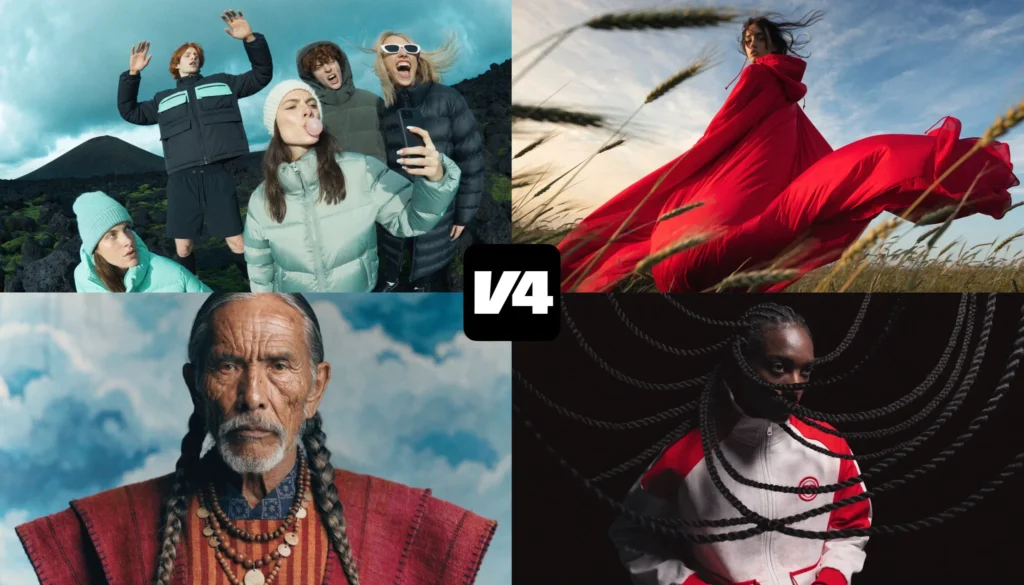
Recraft V4 is an advanced AI generation model built specifically for professional designers and marketers. Unlike general-purpose AI generators, Recraft V4 is trained on a proprietary “aesthetics metric” to produce images with professional design taste, accurate typography, and a polished, anti-stock aesthetic.
Built for “Design Taste,” Not Just Photorealism
Most major AI models are built by tech giants trying to attract casual chat users. They optimize for broad appeal, which inevitably leads to that recognizable, overly glossy “stock” look.
Recraft was built differently. It was developed in deep collaboration with professional designers. Instead of chasing raw photorealism, the model is optimized for design taste. It makes sophisticated, deliberate visual decisions about composition, lighting, and color relationships.
The result is an image that feels structurally sound and meticulously planned.
The Anti-Stock Aesthetic
Most standard models have heavy biases. They want to give you sunny skies or perfectly smiling people. Recraft V4 actively fights this by providing an “anti-stock” aesthetic. It handles complex creative directions beautifully.
In fact, you can feed it up to 10,000 characters of intricate prompt engineering. Whether you need fashion photography with weird proportions, or a dark, moody cinematic still, the model follows your specific artistic vision without forcing a generic overlay onto it.
Key Features That Make Recraft V4 a Game-Changer for Brands and Freelancers
Recraft V4 offers features crucial for brand building, including native editable SVG generation, perfect typography integration, and print-ready 300 DPI CMYK exports. These tools allow users to bypass tedious software workflows and go straight from a text prompt to final production.
Native Editable Vector (SVG) Output
If you work in graphic design, this is the holy grail. Recraft offers a native SVG AI generator on the market that produces real, editable vector graphics.
We aren’t talking about messy, traced bitmaps wrapped in an SVG container. The V4 Vector models generate clean, scalable paths with structured layers and discrete color regions. You can open these files directly in Adobe Illustrator or Figma and immediately edit the anchor points. This makes it the ultimate AI logo generator, providing assets that scale cleanly from a business card to a billboard.
Flawless Typography Integration
Most AI image generators struggle with text, turning letters into alien hieroglyphs. Recraft V4 treats typography as a fundamental, structural design element.
If you prompt it to create a movie poster, it naturally embeds your headlines, subtitles, and even fine print with precise kerning and spatial awareness. The text flows harmoniously with the composition, making it effortless to generate menus, packaging mockups, and bold infographics.
Print-Ready Quality (CMYK & 300 DPI)
Digital assets are great, but the physical world demands higher fidelity. Upgrading to Recraft V4 Pro unlocks the ability to generate images at massive 2048x2048px resolutions.
Even better, you can export these files directly in 300 DPI with CMYK color conversion. This means you can bypass Adobe Photoshop entirely. You get high-fidelity, print-ready AI images that hold up perfectly for books, posters, and large-format magazines.
Exploration Mode for Rapid Ideation
Staring at a blank screen is the hardest part of the creative process. To solve this, the developers introduced Recraft exploration mode.
Instead of typing a prompt and getting one literal interpretation, Exploration Mode generates multiple, highly distinct visual directions from a single idea. It is the perfect tool for the “ideation phase,” allowing you to explore wildly different styles before committing to a final art direction.
How Freelancers and Small Brands Can Make Money with Recraft V4
Freelancers and brands can monetize Recraft V4 by deploying it for commercial product photography, editorial lifestyle campaigns, and typography-integrated marketing. By delivering production-ready assets with precise text and an anti-stock aesthetic, the platform slashes labor costs and elevates scalable client services.
Theory is useful, but commercial viability depends on specific, high-ROI use cases. Here is exactly where Recraft V4 consistently outperforms alternatives in professional workflows, allowing you to maximize your profit margins.
1. Commercial Product Photography
If you manage e-commerce clients, generating hundreds of product variations is a massive logistical expense. Recraft solves this by understanding the actual physics of commercial photography. It delivers accurate proportions, clean backgrounds, and surface logic that reads as physical rather than artificially rendered.
For example, third-party workflow testing by Flora.ai noted that Recraft provides “clean, brand-ready output with minimal correction needed downstream.”
If you prompt the model for a premium skincare bottle mockup on a marble surface with soft studio lighting, the output exercises restraint. It beautifully handles intricate material physics—like micro-reflections or matte finishes—without fighting against strict brand guidelines.
See this commercial photography image below, created with Recraft V4:

2. Editorial Fashion and Lifestyle
The “anti-stock aesthetic” is not just clever marketing language but a foundational feature. Recraft V4 actively fights against generic, plastic stock conventions, offering an intentionally art-directed and thoughtful approach to styling.
When you prompt for something highly specific, like a weathered fisherman in a salt-sprayed jacket with fog rolling in behind him, the output carries an undeniable documentary authenticity. This is the exact kind of high-fashion, editorial realism that traditional stock libraries charge thousands of dollars to license. For brands looking to build a distinct visual identity, bypassing generic AI tropes is a massive competitive advantage.
Related Reading: 13 Untapped Business Models to Monetize AI-Generated Images (Beyond Selling Prints)
3. Campaign Consistency at Scale
Brand safety isn’t just about whether a single image looks good. It is about maintaining a coherent visual language across hundreds of campaign assets. Recraft inherently provides tonal consistency across batch outputs, ensuring your elements feel meticulously considered rather than randomly assembled.
While official custom “Style creation” is currently listed as a feature in development, the model’s baseline prompt accuracy ensures that your multi-channel campaigns remain visually unified.
Whether you are generating an Instagram post, a website hero image, or a print ad, the assets will look like they belong to the same family rather than a group of strangers.
4. Typography-Integrated Marketing
Recraft V4 treats text as a first-class structural element. It embeds typography directly into your compositions with precise kerning, tracking, and spatial awareness.
While competitors struggle to generate anything beyond gibberish letterforms, Recraft seamlessly produces signage, packaging mockups, and bold menus where the typography lives naturally within the scene.
As noted by Flora.ai, this works best for isolated typographic elements. Because the model is officially optimized for short to mid-length phrases, relying on it for dense, multi-line paragraphs remains risky. But for bold hero headlines, brand marks, and environmental signage, its accuracy is unmatched.
Read More: The Blueprint for Easy AI Side Hustle: Building Digital Products for Passive Income
Step-by-Step: How to Get the Best Results from Recraft V4
1. Write a Detailed Prompt:
Take advantage of the 10,000-character limit. Specify your subject, lighting, material textures, and mood. The more detail you provide, the better the art direction.
2. Choose the Right Model:
Select V4 Standard for quick concepting (10 seconds), or switch to Recraft V4 Pro for 2048px high-resolution print work (28 seconds).
3. Select Your Aspect Ratio
Choose from 1:1, 16:9, 9:16, 4:3, and other aspect ratio options based on your exact platform needs.
4. Utilize Exploration Mode
Start broad. Generate diverse visual directions from a simple prompt to find unexpected inspiration before narrowing down your style.

5. Export in the Right Format
Download your final asset as a PNG, JPG, TIFF, or grab the native SVG if you used the vector model.
People Also Read: How to Make Money with AI in 2026: The Ultimate & Proven Beginner’s Guide
Conclusion
Recraft V4 is actively moving AI image generation out of the novelty phase and into the serious, professional production phase. It hands you the keys to exceptional “visual taste,” flawless typography, and production-ready vector files.
Stop settling for flat, uninspired graphics. Start experimenting with Exploration Mode today, push the boundaries of your creative workflows, and elevate your brand’s visual identity before your competition catches on.
Frequently Asked Questions (FAQs) about Recraft V4
How much does Recraft V4 cost?
You can access it on free plans. For heavier use, API costs are $0.25 per image for Pro on WaveSpeedAI, and 24 credits per generation on the ImagineArt platform.
Can Recraft V4 generate real vector files?
Yes. Recraft V4 Vector and Vector Pro models generate true, native SVG files. These feature structured layers and clean geometric paths that you can immediately edit in Illustrator or Figma.
Does Recraft V4 handle text well?
Absolutely. It treats typography as a core structural element of the image. It embeds clear, highly legible text with precise kerning directly into posters, packaging, and infographics.
Is Recraft V4 good for printing?
Yes. The Pro tier generates high-resolution 2048×2048 pixel images. Furthermore, you can natively export these files in 300 DPI with CMYK color conversion, bypassing the need for Photoshop.
What is Recraft V4 Exploration Mode?
Exploration Mode is a feature that allows you to input a single text prompt and instantly generate multiple, highly distinct visual directions. It is designed to accelerate your creative ideation process.